Project: Tenant Management: An Evolutionary Project
Evolution: Conversational Interface
Focus: Chat interfaces, NLP, Conversational AI
Status: ✅ Complete
Introduction to the Conversational Interface evolution of the Tenant Management system.
Evolution Context: This post is part of Evolution 5: Conversational Interface in the Tenant Management Evolutionary Project. This evolution focuses on natural language interfaces, building upon the AI integration established in Evolution 4.
Requirements Context: This iteration continues to fulfill the functional goals from Landlord-Tenant Management System: Requirements and Objectives while introducing a dual-pane conversational interface to enhance usability and data visualization.
One of the biggest challenges in integrating AI into business applications is finding the right balance between conversation and structured data presentation. Chat interfaces are great for flexibility, but they often struggle with displaying dense information like tables, charts, and reports.
In this 5th evolution of the Tenant Management project, we’ve introduced a Conversational Interface that solves this problem using the “Canvas” pattern. This approach provides a dedicated space for rich visualizations while keeping the chat clean and focused on dialogue.
When asking an AI about your data, you might get a simple text answer, or you might get a massive table of numbers. Cramming complex data into a linear chat stream has several drawbacks:
We wanted a solution that offered the best of both worlds: the natural language capability of a chat and the rich visualization of a dashboard.
We implemented a split-screen design (responsive to tabs on mobile) that separates the Conversation from the Content.
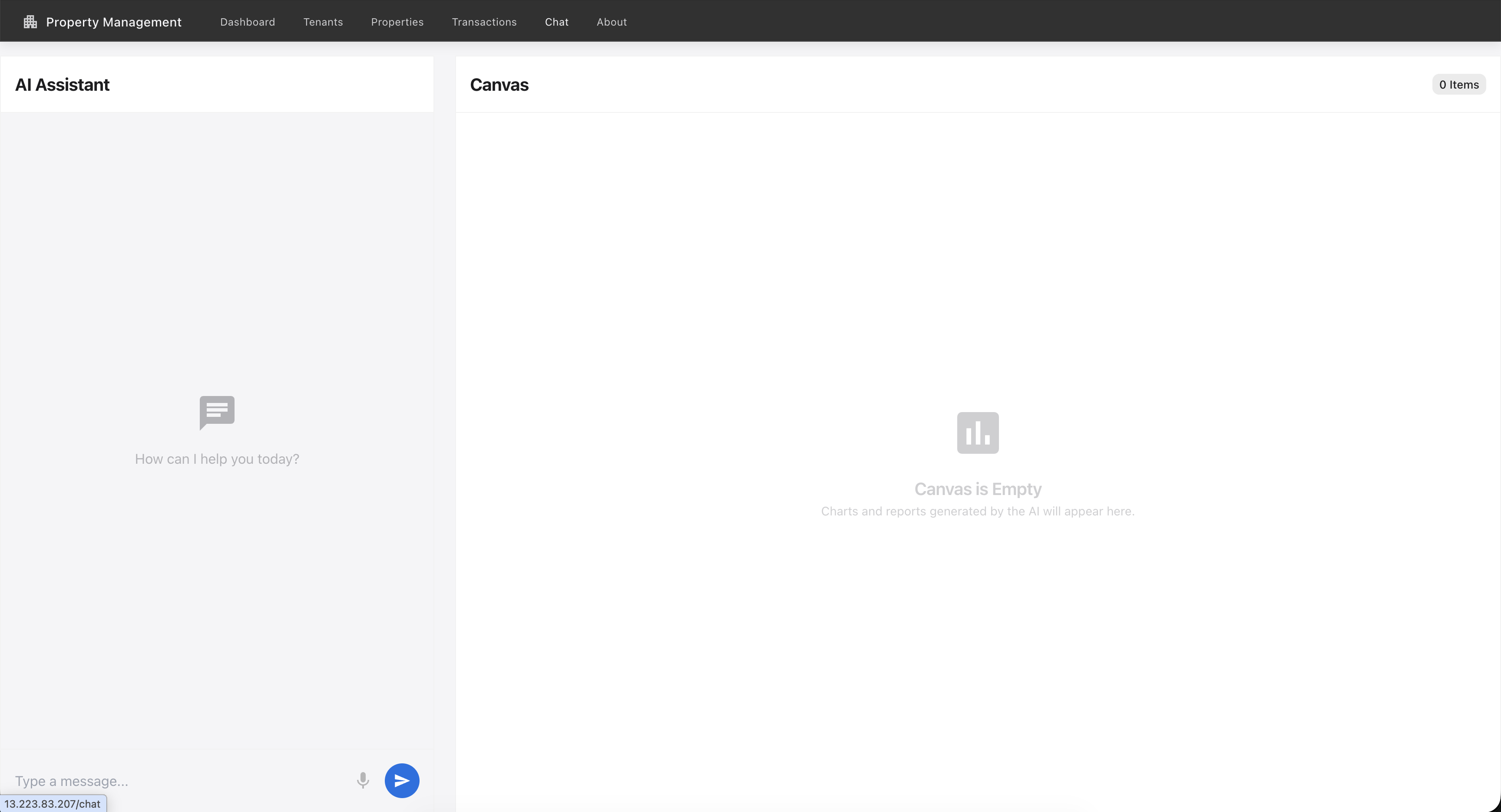 The new dual-pane interface with Chat on the left and an empty Canvas on the right.
Let’s look at some real-world examples of how this interface changes the user workflow.
We asked the AI for a more complex view: “Summary of all tenants for last 3 months, show in table and chart formats”
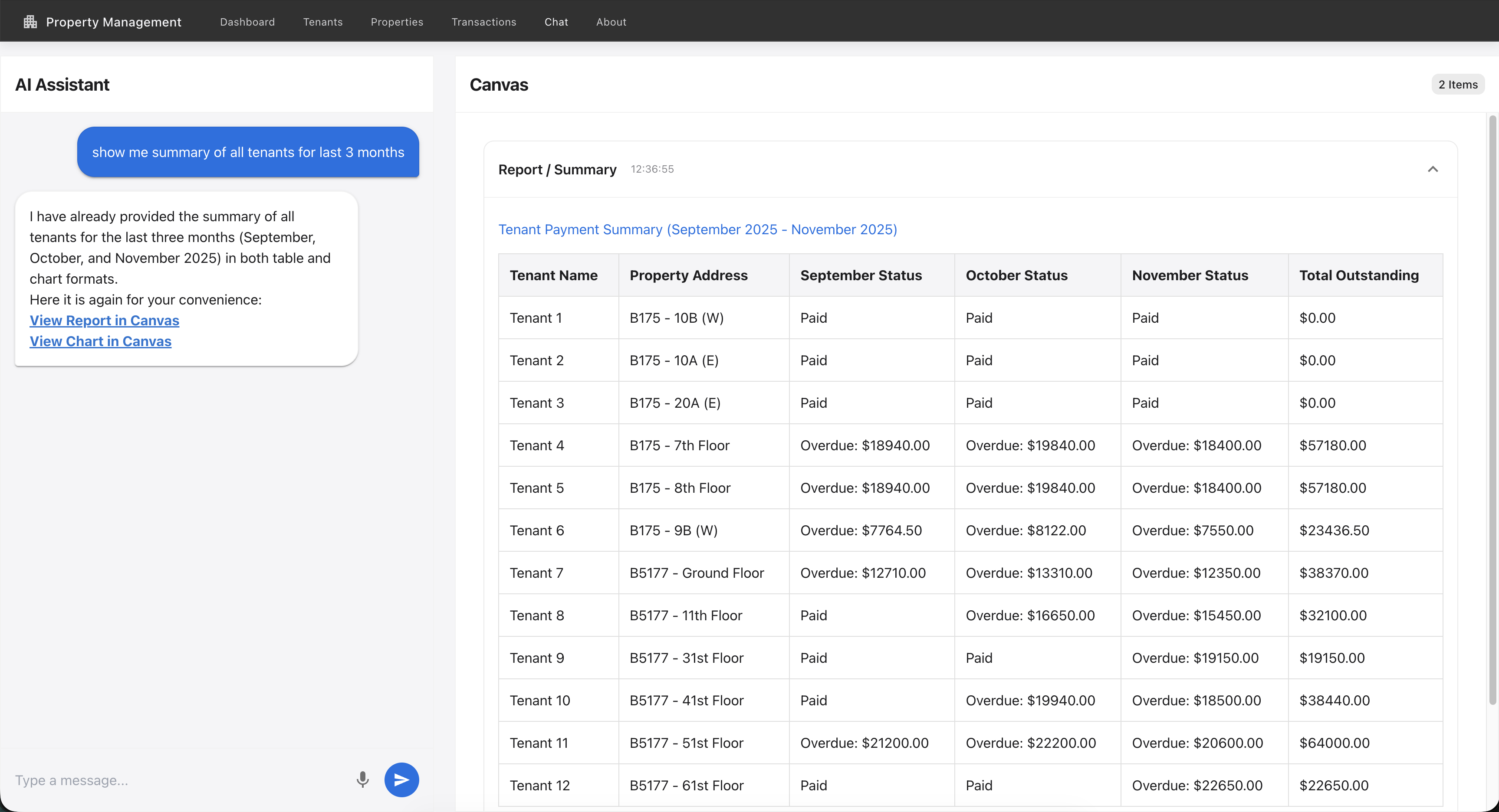
The system first presents a structured data table, perfect for detailed analysis.
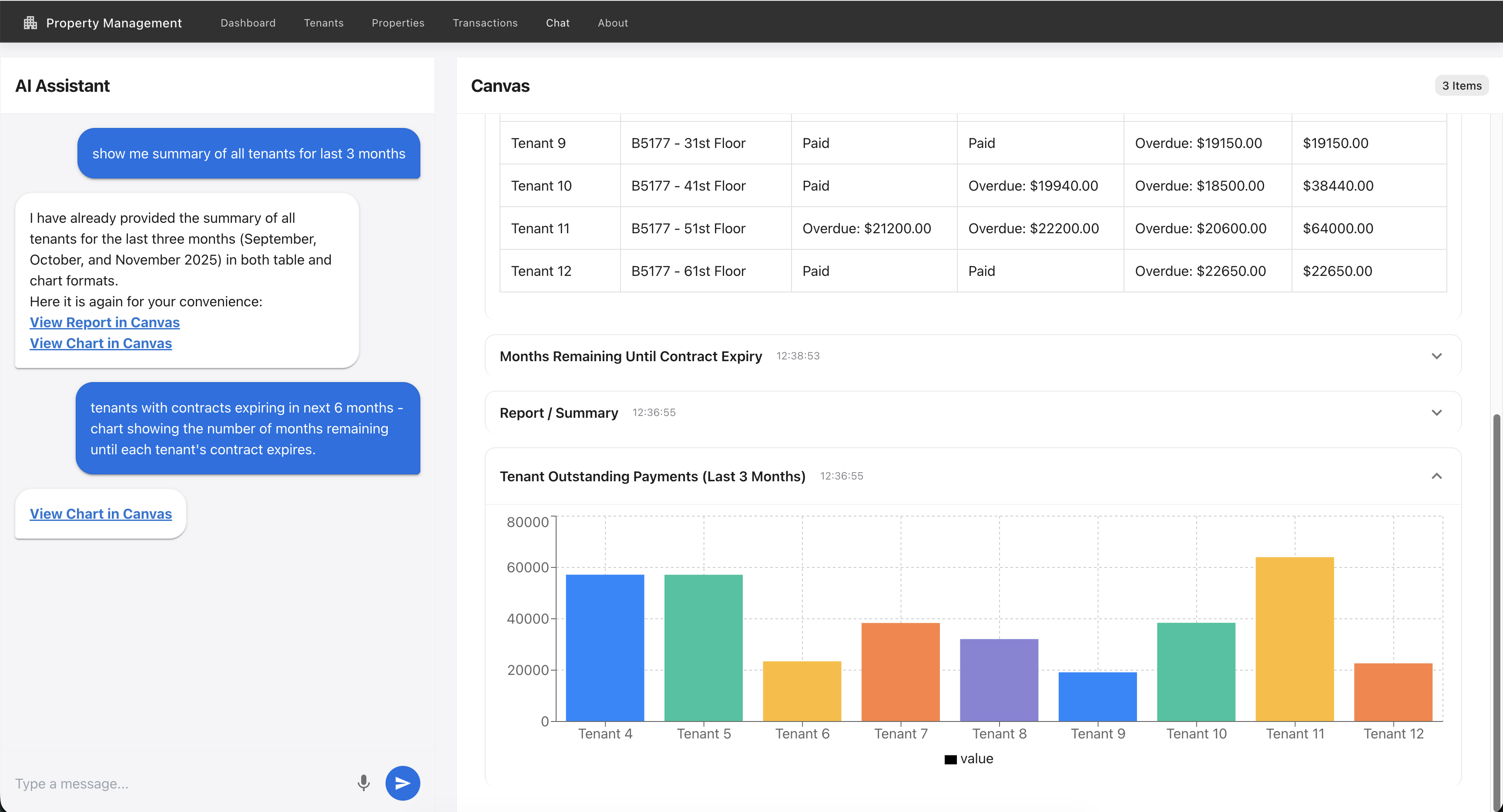
Scrolling down reveals the interactive chart generated from the same data. This common canvas approach allows for multi-modal data representation in a single persistent view, enabling users to switch between raw numbers and visual trends without cluttering the chat stream.
We then asked: “List all tenants with their contract expiring in next 3 months”
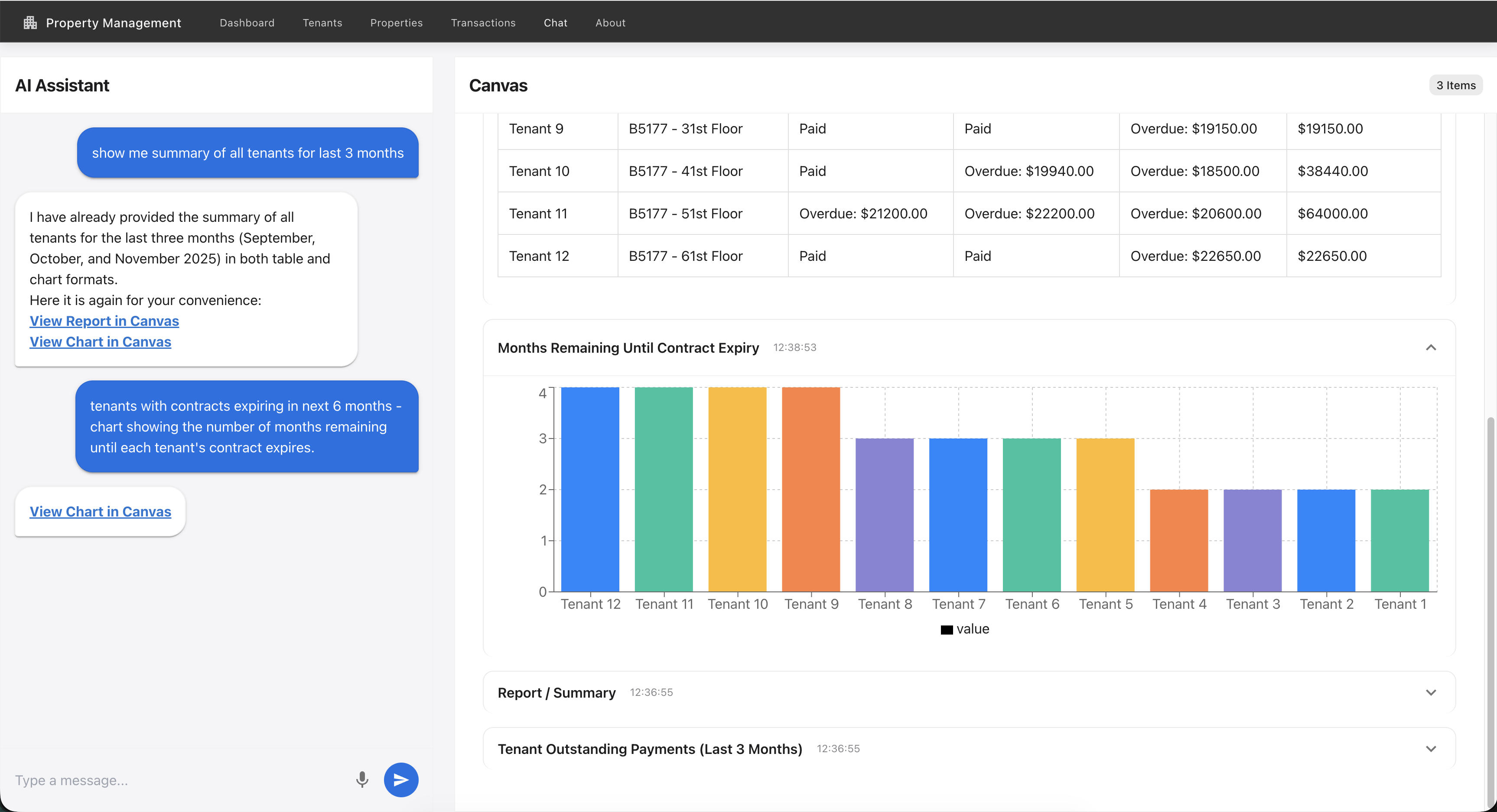
The Canvas updated again, this time showing a detailed list or chart of the specific tenants at risk. This separation allows the user to keep the conversation going (“Send them a reminder email”) while referring to the data on the right.
The frontend is built using React and Material UI. The core magic happens in ChatPage.js.
We use a custom protocol in the AI response to segregate content:
<chart>...</chart> tags denote JSON data for recharts.<canvas>...</canvas> tags denote Markdown content for reports.Here is how we handle the response parsing:
    const handleSend = async () => {
        // ... sending request ...
        const fullResponse = res.data.response;
        let displayResponse = fullResponse;

        // 1. Parse Chart
        const chartMatch = fullResponse.match(/<chart>([\s\S]*?)<\/chart>/);
        if (chartMatch) {
            const chartData = JSON.parse(chartMatch[1]);
            // Add to Canvas History
            setCanvasHistory(prev => [{ type: 'chart', content: chartData, ... }, ...prev]);
            // Remove from chat display
            displayResponse = displayResponse.replace(/<chart>[\s\S]*?<\/chart>/g, '[View Chart in Canvas](#canvas)');
        }

        // 2. Parse Canvas (Markdown)
        const canvasMatch = fullResponse.match(/<canvas>([\s\S]*?)<\/canvas>/);
        if (canvasMatch) {
            // Add to Canvas History
            setCanvasHistory(prev => [{ type: 'markdown', content: canvasMatch[1], ... }, ...prev]);
            // Remove from chat display
            displayResponse = displayResponse.replace(/<canvas>[\s\S]*?<\/canvas>/g, '[View Report in Canvas](#canvas)');
        }

        setMessages(prev => [...prev, { role: 'model', text: displayResponse }]);
    };
This ensures the Chat pane only shows a clean “View in Canvas” link, keeping the conversation flow uninterrupted.
The backend exposes a simple /api/chat endpoint. It leverages the AI Integration Layer (from Evolution 4) but is now enhanced to structure its output with our specific XML-like tags when it decides a visual representation is better than text.
This evolution represents a significant leap in usability. We are no longer just “using AI” in the background; we are giving users a Conversational Interface that empowers them to explore their data on their own terms.
Here’s a question that should be on every engineering leader’s mind right now: are we using AI where it truly adds value, or just because we can?
The landscape of AI agents is evolving from simple chat interfaces to autonomous systems that can do things—browse the web, manage infrastructure, or interac...
“Agentic AI” is the buzzword of the moment. It’s everywhere in my feed, often accompanied by complex diagrams of five different bots talking to each other to...
Evolution 6 (Final): Deploying our full-stack application to Google Cloud Platform using Cloud Run and Cloud SQL. At $18-22/month, it’s 20% cheaper than AWS ...