The journey from local development to cloud deployment is rarely straightforward. Which AWS service should you choose? How much will it cost? What trade-offs are you making? In this final evolution of the Tenant Management project, we deployed our full-stack application (Spring Boot + React + PostgreSQL) using 5 different AWS deployment approaches, documenting the architecture, costs, and learnings from each.
Evolution Context: This post is part of Evolution 6: Cloud Deployment Strategies in the Tenant Management Evolutionary Project. This evolution focuses on cloud infrastructure and deployment strategies, building upon the conversational interface established in Evolution 5.
Requirements Context: This iteration fulfills the deployment and infrastructure goals from Landlord-Tenant Management System: Requirements and Objectives by exploring multiple production-ready deployment strategies with comprehensive cost analysis.
The Deployment Challenge
Our Tenant Management application is a modern full-stack system:
- Backend: Java 21 with Spring Boot 3.3.4
- Frontend: React 18 with Tailwind CSS
- Database: PostgreSQL 16
- AI Integration: Google Gemini 2.5 Flash for intelligent features
The question: How do we deploy this to AWS? And more importantly, which approach is right for different scenarios?
The 5 Deployment Approaches
We experimented with 5 distinct AWS deployment strategies, each with different cost profiles, complexity levels, and use cases:
| Approach |
Monthly Cost |
Complexity |
Best For |
Status |
| 1. Low-Cost EC2 + Spot |
~$10-13 |
Medium |
Dev/Testing, Demos |
✅ Complete |
| 2. AWS Elastic Beanstalk |
~$100+ |
Low |
Quick Production Deploy |
✅ Complete |
| 3. AWS App Runner |
~$50-80 |
Very Low |
Serverless Containers |
✅ Complete |
| 4. AWS ECS (Fargate) |
~$70-120 |
Medium-High |
Production Microservices |
✅ Complete |
| 5. Standard EC2 + ALB |
~$80-100 |
High |
Full Control, HA Setup |
✅ Complete |
Let’s dive deep into each approach.
Approach 1: Low-Cost EC2 with Spot Instances
| Monthly Cost: ~$10-13 |
Branch: feature/aws-lowcost-deployment |
Architecture Overview
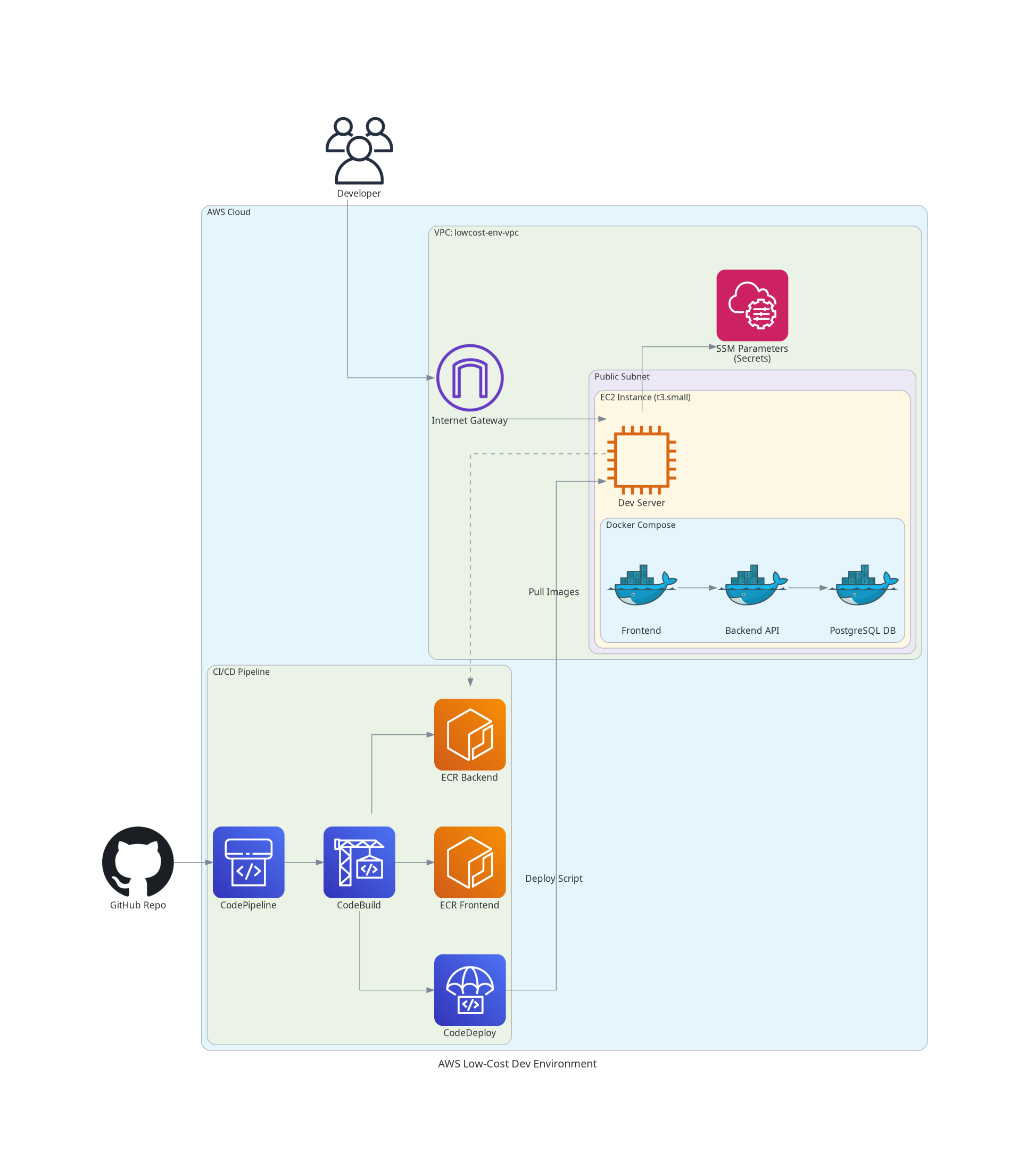
This approach consolidates the entire stack onto a single EC2 Spot instance, eliminating expensive managed services like RDS, ALB, and NAT Gateways.
Key Components
- Single EC2 Spot Instance: t3.small Spot instance (70-90% cheaper than On-Demand)
- Containerized Database: PostgreSQL 16 runs as a Docker container
- Docker Compose: Orchestrates all services (db, api, frontend)
- Public Subnet: Direct internet access with Security Groups
- CloudWatch Logs: All container logs stream to
/app/lowcost-env
Cost Breakdown
| Component |
Specification |
Monthly Cost |
| Compute (Spot) |
EC2 t3.small Spot |
~$2-5 |
| Storage |
EBS gp3 30GB |
~$2.40 |
| Database |
Self-hosted PostgreSQL |
$0 |
| Networking |
Public IP + Data Transfer |
~$1-3 |
| CI/CD |
CodePipeline + CodeBuild |
~$2-3 |
| Total |
|
~$10-13 |
Pros & Cons
✅ Pros:
- Extremely Cost-Effective: 80-90% cheaper than managed services
- Simple Architecture: Everything on one instance
- Full CI/CD: Automated deployments via CodePipeline
- CloudWatch Integration: Comprehensive logging and monitoring
❌ Cons:
- Spot Interruptions: Instance can be terminated (though rare for t3.small)
- No High Availability: Single point of failure
- Manual Management: Database backups and Docker management are user responsibilities
- Not Production-Ready: Lacks redundancy
Best Use Cases
Ideal for:
- Development and testing environments
- Proof of concepts (POCs)
- Demos and presentations
- Learning and experimentation
- Personal projects with low traffic
Not recommended for:
- Production workloads requiring high availability
- Applications with strict uptime SLAs
- High-traffic applications
Key Learnings
- Spot Instances are Reliable: For t3.small, interruptions are rare. Persistent requests ensure automatic recovery.
- Containerized DB is Viable: For dev/test, running PostgreSQL in Docker saves significant cost with minimal trade-offs.
- Ubuntu vs Amazon Linux: Ubuntu 24.04 provides better Docker support and package management.
- CloudWatch Logging: Essential for debugging containerized applications without SSH access.
Approach 2: AWS Elastic Beanstalk
| Monthly Cost: ~$100+ |
Branch: feature/aws-beanstalk-deployment |
Architecture Overview
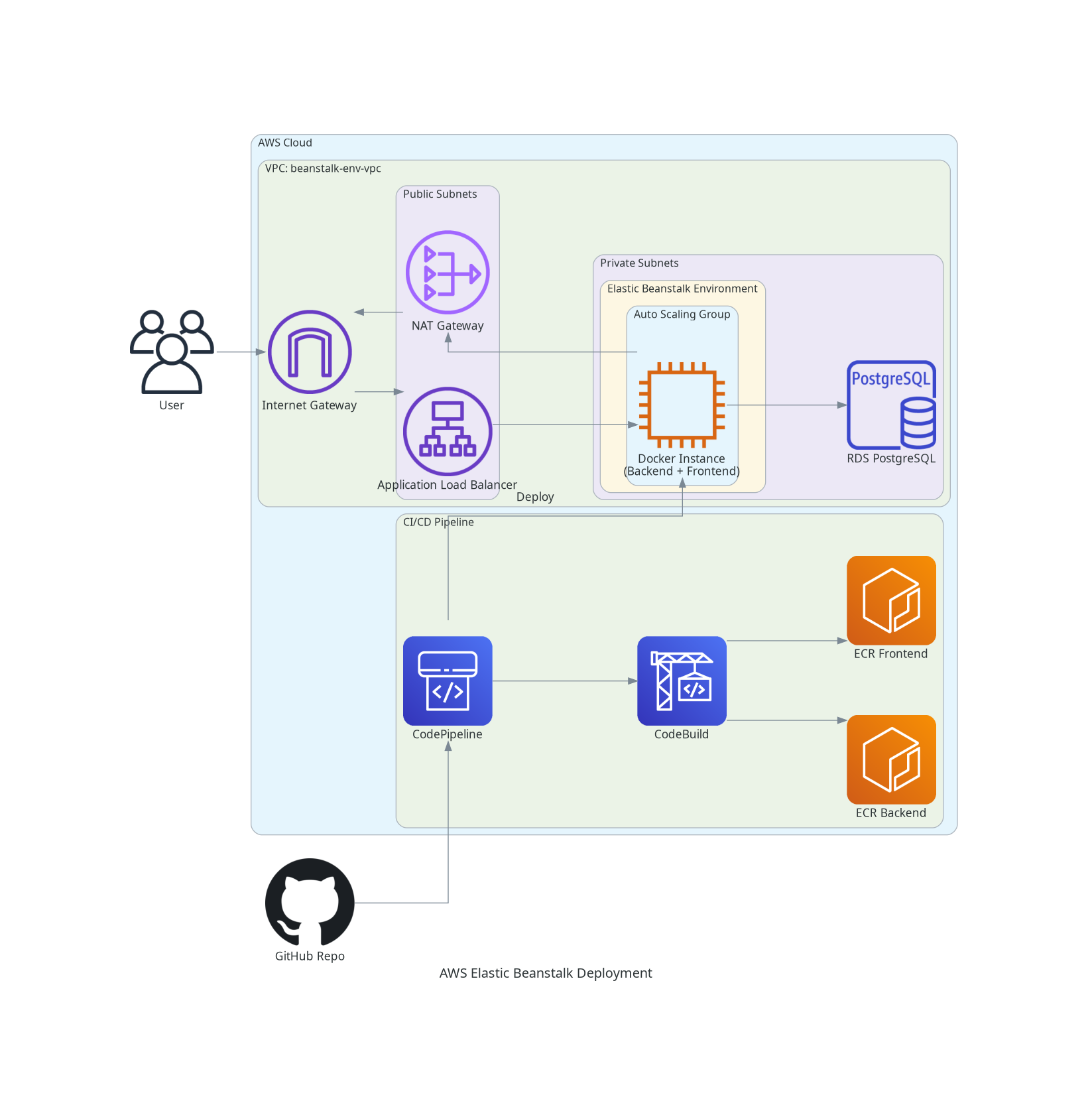
Elastic Beanstalk provides a Platform-as-a-Service (PaaS) solution that automatically handles deployment, capacity provisioning, load balancing, and auto-scaling.
Key Components
- VPC:
beanstalk-env-vpc with public and private subnets
- Elastic Beanstalk Environment: Docker platform on Amazon Linux 2023
- Auto Scaling: Automatically provisions and manages EC2 instances
- Application Load Balancer: Distributes traffic across instances
- RDS PostgreSQL: Managed database (db.t4g.micro) in private subnet
- NAT Gateway: Enables outbound internet access for private subnets
Cost Breakdown
| Component |
Specification |
Monthly Cost |
| EC2 Instances |
t3.micro (min 1, max 2) |
~$15-30 |
| Application Load Balancer |
ALB with health checks |
~$23 |
| RDS PostgreSQL |
db.t4g.micro, 20GB |
~$18 |
| NAT Gateway |
Data processing + hours |
~$35-45 |
| EBS Storage |
gp3 volumes |
~$5 |
| Data Transfer |
Outbound traffic |
~$5-10 |
| Total |
|
~$100+ |
Pros & Cons
✅ Pros:
- Managed Infrastructure: Beanstalk handles provisioning, scaling, monitoring
- Auto Scaling: Automatically adjusts capacity based on load
- Zero-Downtime Deployments: Rolling updates with health checks
- Easy Rollbacks: One-click deployment history
- Integrated Monitoring: CloudWatch metrics and logs
❌ Cons:
- Higher Cost: ALB and NAT Gateway add significant expense
- Less Control: Platform abstractions limit customization
- Platform Lock-in: Beanstalk-specific configuration
- Complexity for Simple Apps: Overkill for small projects
Best Use Cases
Ideal for:
- Production applications requiring high availability
- Teams wanting managed infrastructure
- Applications with variable traffic (auto-scaling)
- Quick production deployments
Key Learnings
- Platform Abstraction: Beanstalk simplifies deployment but adds cost and reduces flexibility
- Docker Compose Support: Multi-container apps work well with Beanstalk’s Docker platform
- Environment Configuration: Proper environment variable management is crucial
- Health Checks: Beanstalk’s health monitoring requires proper endpoint configuration
Approach 3: AWS App Runner
| Monthly Cost: ~$50-80 |
Branch: feature/aws-apprunner-deployment |
Architecture Overview
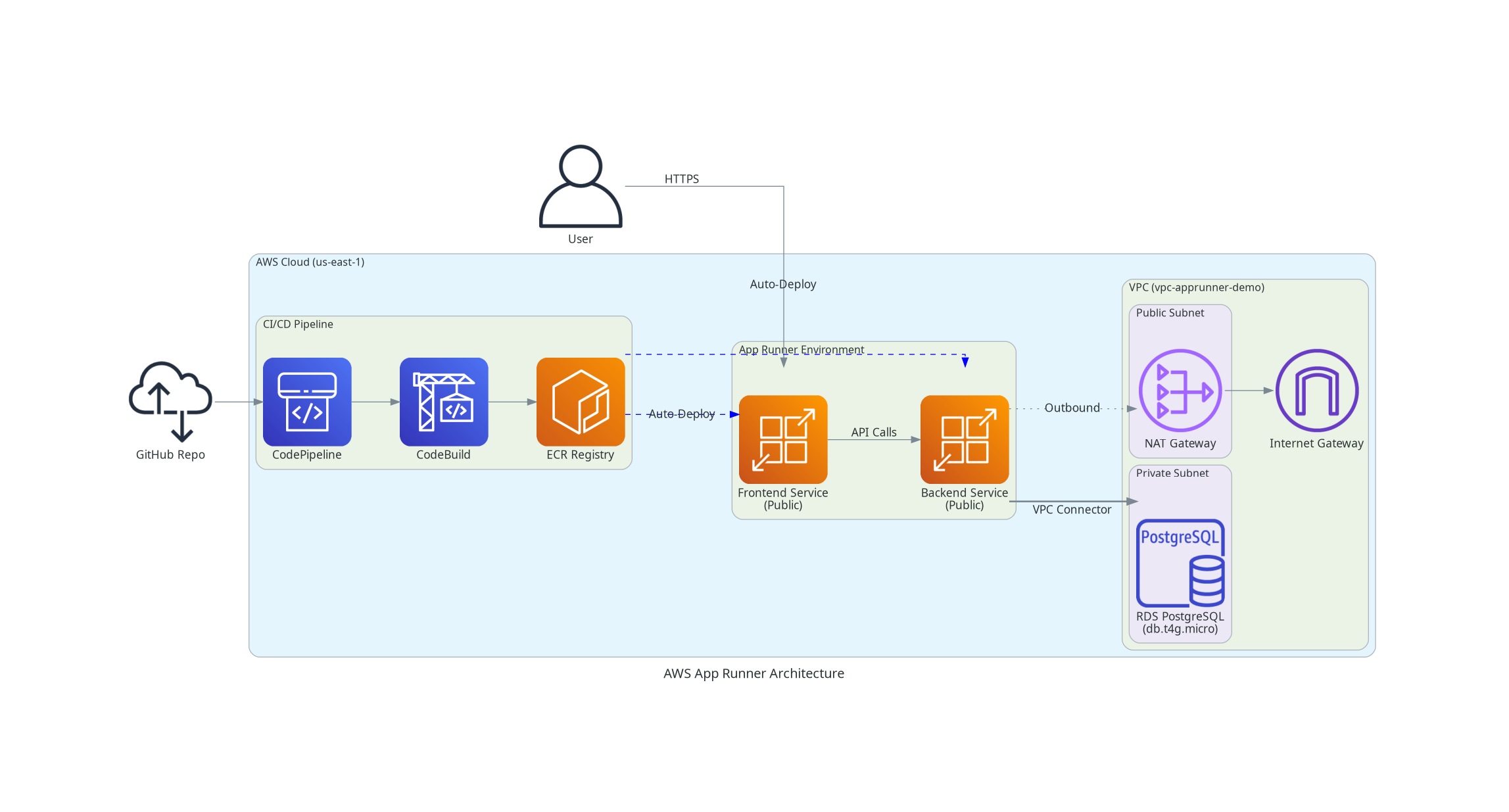
AWS App Runner is a fully managed serverless container service that automatically builds, deploys, and scales containerized web applications.
Key Components
- VPC:
apprunner-demo-vpc with VPC Connector
- App Runner Services: Separate services for Backend and Frontend
- VPC Connector: Bridges App Runner to private subnets
- RDS PostgreSQL: Managed database (db.t4g.micro) in private subnet
- Auto-Deploy: Triggers on new ECR image push
Cost Breakdown
| Component |
Specification |
Monthly Cost |
| App Runner (Backend) |
1 vCPU, 2GB RAM |
~$25 |
| App Runner (Frontend) |
1 vCPU, 2GB RAM |
~$25 |
| RDS PostgreSQL |
db.t4g.micro, 20GB |
~$18 |
| NAT Gateway |
For VPC Connector |
~$35 |
| Data Transfer |
Outbound traffic |
~$5 |
| Total |
|
~$50-80 |
Pros & Cons
✅ Pros:
- Fully Managed: Zero infrastructure management
- Auto-Scaling: Scales based on traffic automatically
- Simple Deployment: Just push to ECR
- HTTPS by Default: Automatic SSL/TLS certificates
- Pay-per-Use: Only pay for compute time used
❌ Cons:
- Cold Starts: Initial requests may be slow after idle period
- Limited Customization: Less control over infrastructure
- VPC Connector Costs: NAT Gateway still required for private resources
- Regional Availability: Not available in all AWS regions
- Container Size Limits: Image size and memory constraints
Best Use Cases
Ideal for:
- Microservices architectures
- API backends with variable traffic
- Containerized web applications
- Teams wanting zero infrastructure management
- Development and staging environments
Key Learnings
- VPC Connector is Essential: Required for accessing private RDS instances
- Auto-Deploy Feature: Simplifies CI/CD - just push to ECR
- Service-to-Service Communication: Use public URLs or configure private networking
- Cost Optimization: Pause services when not needed to save costs
Approach 4: AWS ECS Fargate
| Monthly Cost: ~$70-120 |
Branch: feature/aws-ecs-deployment |
Architecture Overview
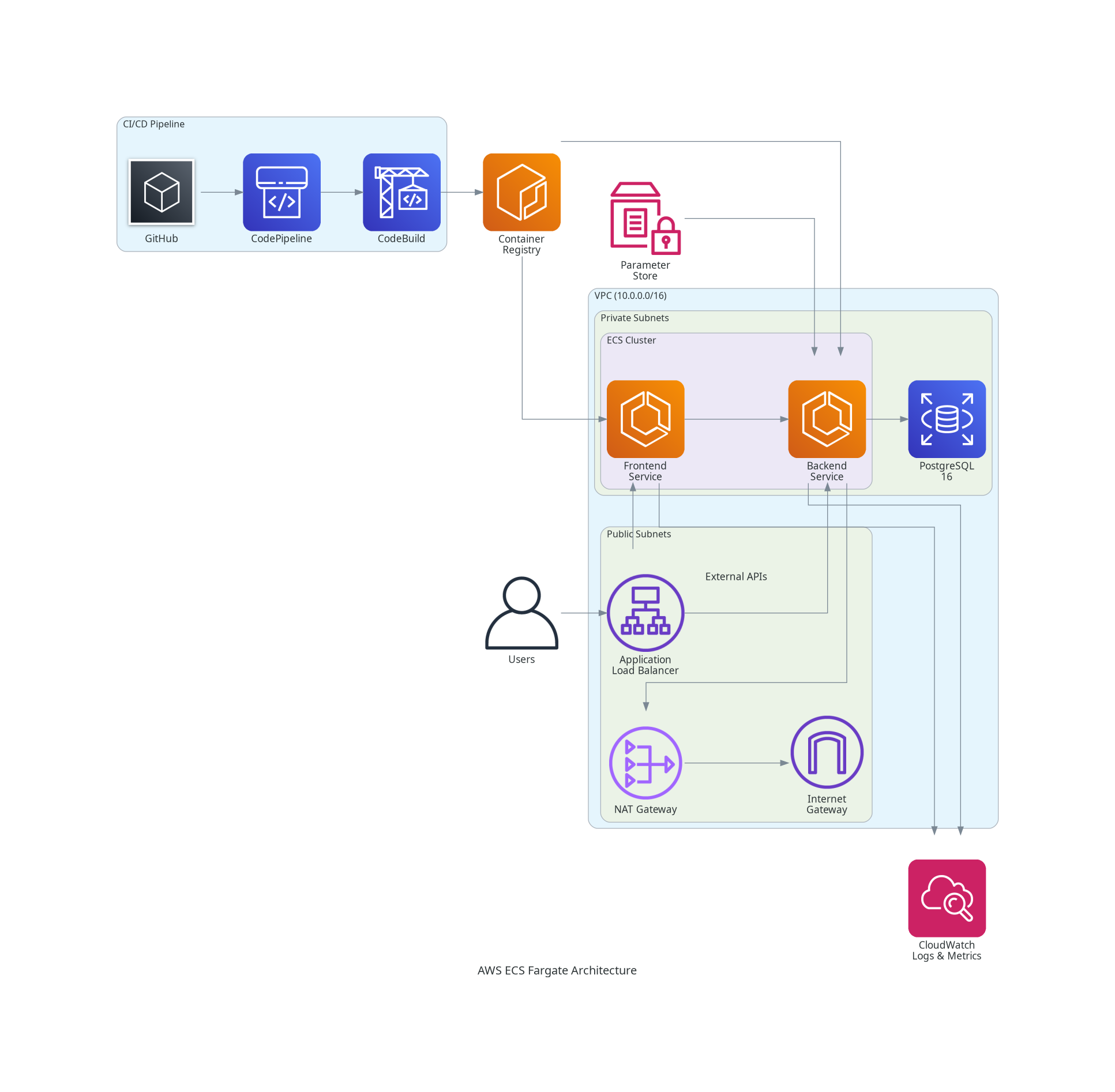
AWS ECS (Elastic Container Service) with Fargate provides a serverless container orchestration platform. Unlike EC2-based deployments, Fargate eliminates the need to manage servers.
Key Components
- VPC:
vpc-ecs-demo (10.0.0.0/16) with public and private subnets
- ECS Fargate: Serverless container engine
- Frontend Service: React application with Nginx
- Backend Service: Spring Boot API
- Application Load Balancer: Path-based routing to services
- RDS PostgreSQL: Managed database with automated backups
- AWS Cloud Map: Service discovery for container-to-container communication
- Container Insights: Detailed metrics and monitoring
Cost Breakdown
| Component |
Specification |
Monthly Cost |
| ECS Fargate (Backend) |
0.5 vCPU, 1GB RAM |
~$25-35 |
| ECS Fargate (Frontend) |
0.25 vCPU, 0.5GB RAM |
~$15-20 |
| Application Load Balancer |
ALB with health checks |
~$23 |
| RDS PostgreSQL |
db.t4g.micro, 20GB |
~$18 |
| NAT Gateway |
Data processing + hours |
~$35-45 |
| CloudWatch Logs |
Log storage |
~$3-5 |
| Total |
|
~$70-120 |
Pros & Cons
✅ Pros:
- No Server Management: Fargate handles all infrastructure
- Auto-Scaling: Scales containers based on demand
- High Availability: Multi-AZ deployment support
- Security: Containers in private subnets, isolated networking
- Container Insights: Detailed performance metrics
- Rolling Updates: Zero-downtime deployments
❌ Cons:
- Higher Cost: 20-30% more expensive than EC2 launch type
- NAT Gateway Costs: Required for outbound internet access
- Complexity: Requires understanding of ECS concepts (tasks, services, clusters)
- Cold Start: Initial container startup time
Best Use Cases
Ideal for:
- Production microservices architectures
- Applications requiring high availability
- Teams wanting serverless container orchestration
- Scalable web applications
- Environments with variable traffic patterns
Key Learnings
- Service Discovery: AWS Cloud Map enables seamless container-to-container communication
- Security Groups: Layered security (ALB → ECS → RDS) provides defense in depth
- Rolling Updates: Health checks are essential for zero-downtime deployments
- Fargate vs EC2: Fargate trades ~20-30% higher cost for complete operational simplicity
- Container Insights: Essential for production workloads—provides invaluable visibility
Approach 5: Standard EC2 with Auto Scaling
| Monthly Cost: ~$80-100 |
Branch: feature/aws-ec2-deployment |
Architecture Overview
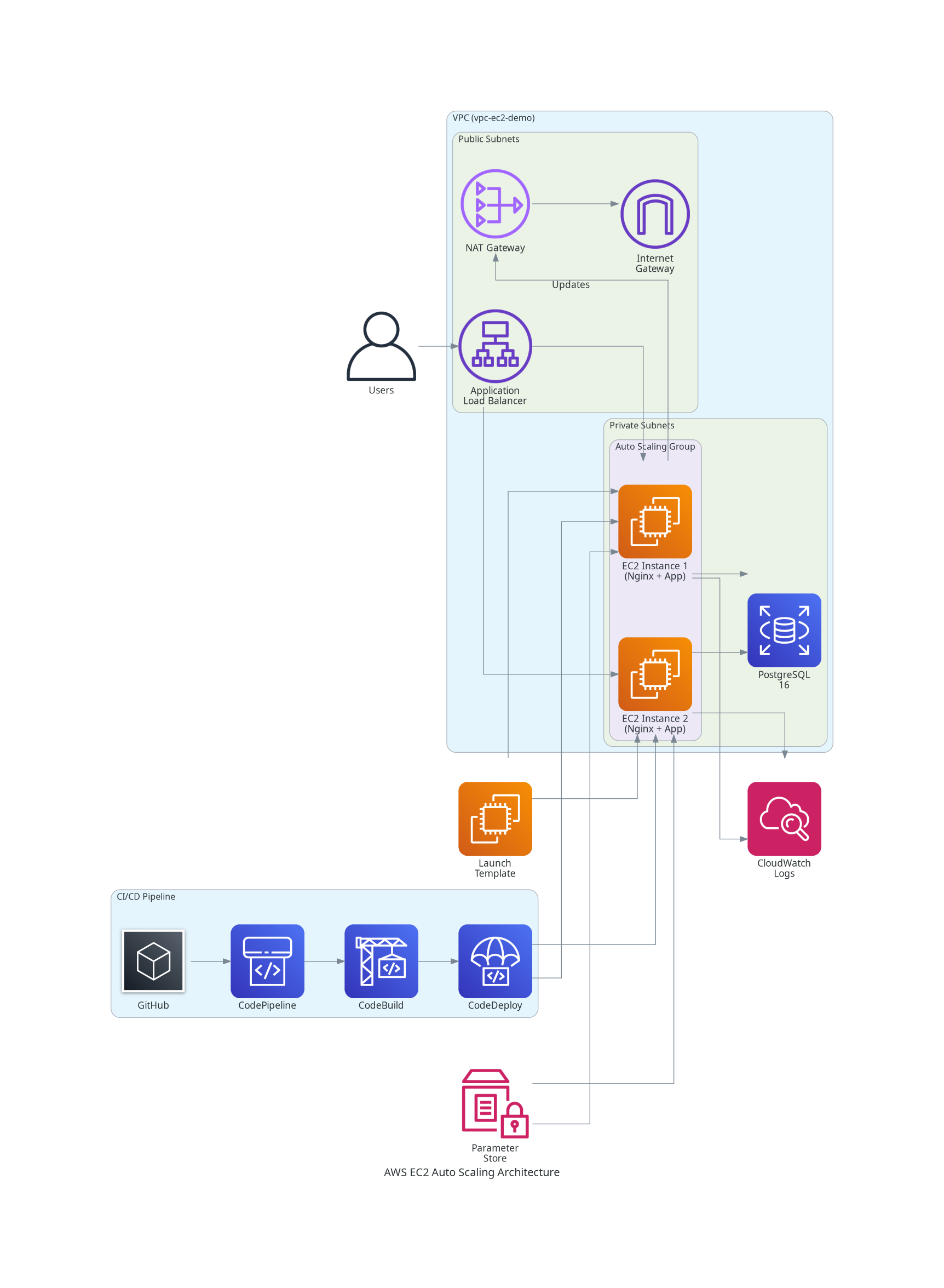
This approach uses traditional EC2 instances managed by an Auto Scaling Group, fronted by an Application Load Balancer. It provides maximum control over infrastructure.
Key Components
- VPC:
vpc-ec2-demo with public and private subnets
- Auto Scaling Group: Manages EC2 instances (t3.micro, min 1, max 2)
- Launch Template: Defines instance configuration
- Nginx: Reverse proxy on each EC2 instance
- Port 80: Routes to Frontend (React static files)
- Port 8080: Proxies to Backend (Spring Boot)
- Application Load Balancer: Distributes traffic across instances
- RDS PostgreSQL: Managed database in private subnet
- CodeDeploy: Deploys to EC2 instances with lifecycle hooks
Cost Breakdown
| Component |
Specification |
Monthly Cost |
| EC2 Instances |
t3.micro (min 1, max 2) |
~$15-30 |
| Application Load Balancer |
ALB with health checks |
~$23 |
| RDS PostgreSQL |
db.t4g.micro, 20GB |
~$18 |
| NAT Gateway |
Data processing + hours |
~$35-45 |
| EBS Storage |
gp3 volumes |
~$5 |
| Data Transfer |
Outbound traffic |
~$5 |
| Total |
|
~$80-100 |
Pros & Cons
✅ Pros:
- Full Control: Complete control over instance configuration
- High Availability: Auto Scaling Group ensures redundancy
- Flexible Scaling: CPU-based auto-scaling policies
- Traditional Deployment: Familiar deployment patterns
- SSM Session Manager: Secure access without SSH keys
- CloudWatch Integration: Comprehensive logging and monitoring
❌ Cons:
- Higher Operational Overhead: Manual instance management
- Patching Responsibility: OS and security updates are user-managed
- Complexity: More moving parts to configure and maintain
- NAT Gateway Costs: Significant expense for outbound traffic
Best Use Cases
Ideal for:
- Production applications requiring full control
- Traditional deployment workflows
- High-availability setups
- Teams comfortable with EC2 management
- Applications with predictable traffic patterns
Key Learnings
- CodeDeploy Lifecycle Hooks: Essential for graceful deployments and health validation
- Nginx as Reverse Proxy: Simplifies routing and SSL termination
- Instance Warm-up: New instances need time to download dependencies—configure appropriate grace periods
- CloudWatch Agent: Essential for streaming logs from EC2 to CloudWatch
- SSM Session Manager: Eliminates need for SSH key management and provides audit trail
Comprehensive Comparison
Cost Comparison Matrix
| Approach |
Monthly Cost |
Cost per Hour |
Best Value For |
| Low-Cost EC2 + Spot |
$10-13 |
~$0.014 |
Dev/Testing |
| App Runner |
$50-80 |
~$0.069 |
Serverless Simplicity |
| ECS Fargate |
$70-120 |
~$0.097 |
Production Microservices |
| Standard EC2 + ALB |
$80-100 |
~$0.111 |
Full Control |
| Elastic Beanstalk |
$100+ |
~$0.139 |
Managed Production |
Complexity vs Control
graph LR
    A[Low Complexity\nLow Control] --> B[App Runner]
    A --> C[Elastic Beanstalk]
    D[Medium Complexity\nMedium Control] --> E[ECS Fargate]
    D --> F[Low-Cost EC2]
    G[High Complexity\nHigh Control] --> H[Standard EC2 + ALB]

    style B fill:#4caf50
    style C fill:#66bb6a
    style E fill:#ffa726
    style F fill:#ffa726
    style H fill:#ef5350
Decision Matrix
| Scenario |
Recommended Approach |
Why |
| Development/Testing |
Low-Cost EC2 + Spot |
Minimal cost, full functionality |
| Quick Production Deploy |
Elastic Beanstalk |
Managed infrastructure, auto-scaling |
| Serverless Preference |
App Runner |
Zero infrastructure management |
| Microservices Architecture |
ECS Fargate |
Container orchestration, scalability |
| Maximum Control |
Standard EC2 + ALB |
Full customization, traditional patterns |
| Cost-Conscious Production |
App Runner or ECS Fargate |
Balance of cost and features |
| High-Traffic Production |
ECS Fargate or EC2 + ALB |
Proven scalability, reliability |
Common Architecture Components
All deployment approaches share these core components:
- VPC: Isolated network with public and private subnets
- RDS PostgreSQL: Managed database in private subnet (except Low-Cost)
- Security Groups: Layered security controls
- CloudWatch: Logging and monitoring
- CI/CD Pipeline: CodePipeline + CodeBuild for automated deployments
- Terraform: Infrastructure as Code for reproducibility
Key Takeaways
1. There’s No One-Size-Fits-All Solution
Each deployment approach has distinct trade-offs. The “best” choice depends on:
- Budget constraints
- Operational expertise
- Scalability requirements
- High availability needs
- Control vs convenience preferences
2. Cost Optimization Requires Trade-offs
- Low-Cost EC2: Sacrifices high availability for 80-90% cost savings
- Managed Services: Pay premium for operational simplicity
- NAT Gateway: Single biggest cost driver in most architectures (~$35-45/month)
3. Serverless Isn’t Always Cheaper
- App Runner and ECS Fargate offer operational simplicity but cost more than optimized EC2
- For consistent workloads, EC2 Reserved Instances can be more cost-effective
- Serverless shines for variable traffic patterns
4. Infrastructure as Code is Essential
All approaches use Terraform for:
- Reproducibility across environments
- Version control of infrastructure
- Easy teardown and recreation
- Documentation through code
5. Monitoring and Logging are Non-Negotiable
CloudWatch integration across all approaches enables:
- Debugging without SSH access
- Performance monitoring
- Cost tracking
- Security auditing
6. CI/CD Automation Pays Off
Automated pipelines (CodePipeline + CodeBuild) provide:
- Consistent deployments
- Reduced human error
- Faster iteration cycles
- Rollback capabilities
Evolution Complete: Lessons Learned
This final evolution of the Tenant Management project represents a comprehensive exploration of AWS deployment strategies. From a $10/month development environment to enterprise-grade production deployments, we’ve documented the full spectrum of possibilities.
The Journey So Far
- Evolution 1: Single-file Python application
- Evolution 2: Modular monolith with React
- Evolution 3: Enterprise Java stack with Spring Boot
- Evolution 4: AI integration with MCP and LLM APIs
- Evolution 5: Conversational interface with chat UX
- Evolution 6: Cloud deployment across 5 AWS approaches ✅
What We’ve Learned
- Architecture Evolution: From single-file to cloud-native microservices
- Technology Mastery: Python, Java, React, Docker, Kubernetes concepts, AWS services
- Cost Awareness: Understanding the financial implications of architectural decisions
- Deployment Strategies: Hands-on experience with 5 different AWS deployment patterns
- Trade-off Analysis: No perfect solution—only informed decisions based on requirements
Real-World Application
These experiments provide a decision-making framework for future projects:
- Prototypes/Demos: Low-Cost EC2 + Spot
- Startups/MVPs: App Runner (simplicity) or Low-Cost EC2 (budget)
- Growing Applications: Elastic Beanstalk (managed) or ECS Fargate (scalability)
- Enterprise Applications: ECS Fargate (microservices) or EC2 + ALB (control)
Future Experiments
While this evolution is complete, the learning continues:
- ☐ Google Cloud Platform (GCP) deployments
- ☐ Kubernetes (EKS/GKE) orchestration
- ☐ Multi-cloud comparison (AWS vs GCP vs Azure)
- ☐ Cost optimization deep dive
- ☐ Performance benchmarking across approaches
Resources
All code, Terraform configurations, and deployment scripts are available in the GitHub repository:
- Repository: tenant-management-java-app
- Branches:
feature/aws-lowcost-deploymentfeature/aws-beanstalk-deploymentfeature/aws-apprunner-deploymentfeature/aws-ecs-deploymentfeature/aws-ec2-deployment
Architecture Diagrams
Conclusion
Deploying a full-stack application to AWS is not a simple “click and deploy” process—it requires understanding trade-offs, costs, and operational implications. By experimenting with 5 different approaches, we’ve gained invaluable insights into:
- Cost structures of different AWS services
- Operational complexity of managed vs self-managed infrastructure
- Scalability patterns for different traffic profiles
- Security best practices across deployment models
- CI/CD automation for consistent deployments
This knowledge empowers informed decision-making for future projects, ensuring we choose the right deployment strategy based on requirements, not assumptions.
The Tenant Management evolutionary project is now complete, having progressed from a single Python file to a cloud-deployed, AI-enhanced, production-ready application with comprehensive deployment options. The journey has been transformative, and the learnings will inform every future architectural decision.
Thank you for following this evolution! 🚀
December 10, 2025
cloud-architecture, infrastructure, devops
Evolution 6: Exploring and comparing 5 different AWS deployment strategies for a full-stack application—from $10/mont...
AWS
Cloud Deployment
ECS
January 02, 2026
cloud-architecture, infrastructure, devops
Evolution 6 (Final): Deploying our full-stack application to Google Cloud Platform using Cloud Run and Cloud SQL. At ...
GCP
Cloud Run
Cloud SQL
Evolution Summary
Total Posts: 2
Focus: AWS deployment approaches and cost optimization
Technologies: AWS, Terraform, Docker, CI/CD
Project: Tenant Management: An Evolutionary Project
Evolution: Cloud Deployment Strategies
Focus: AWS deployment approaches and cost optimization
Status:
✅ Complete