Project: Tenant Management: An Evolutionary Project
Evolution: AI-Enhanced Interface
Focus: AI/ML, LLM APIs, Enhanced UX
Status: ✅ Complete

In our previous post, we explored the technical foundation of converting our Tenant Management REST API into an MCP server. Today, we’re diving into something truly transformative: demonstrating the unlimited possibilities that AI and MCP unlock for users—possibilities that were simply impossible with traditional UI+API approaches.
Evolution Context: This post is part of Evolution 4: AI Integration Layer LLM APIs + MCP Enhanced UX in the Tenant Management Evolutionary Project. This evolution focuses on AI integration and enhanced user experience, building upon the enterprise-ready Spring Boot application established in Evolution 3.
Requirements Context: This iteration continues to fulfill the functional goals from Landlord-Tenant Management System: Requirements and Objectives while introducing AI-powered capabilities that dramatically enhance user flexibility and data exploration.
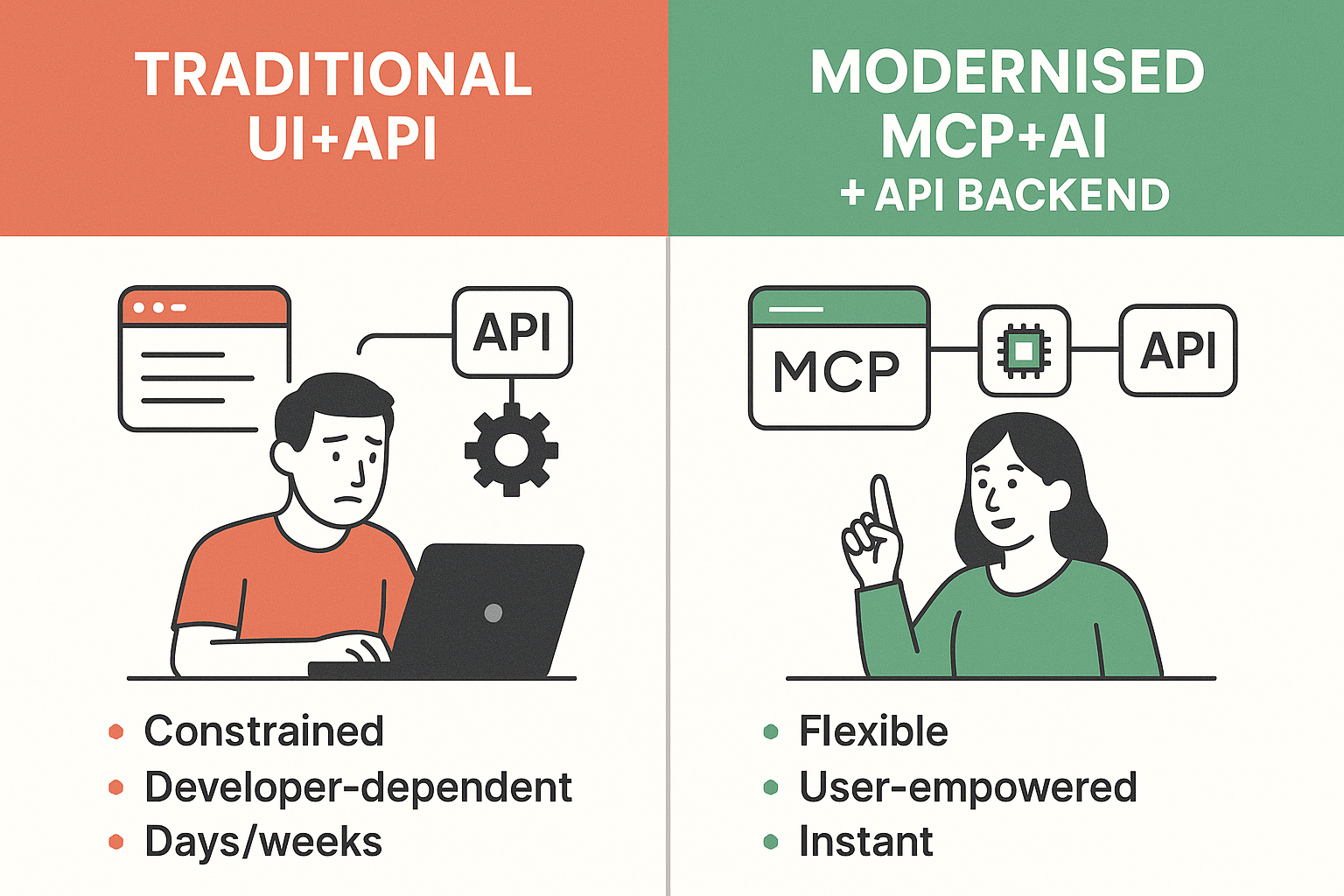
The transformation from traditional UI+API constraints to MCP+AI unlimited possibilities—enabling instant, user-driven insights without developer dependencies.
In our WebUI Demo post, we showcased a beautiful, functional React application with a Spring Boot backend. The application provided:
But here’s the critical limitation: Users could only interact with predefined features that developers had explicitly coded into the UI. Want an on-demand insight? Wait for a developer to build it. Need a specific calculation? It’s not available unless it was pre-programmed. Need to analyze data in a different way? You’re constrained by what the interface offers.
graph TD
    A[User Request] -->|Limited Options| B[Predefined UI Features]
    B -->|Fixed Functionality| C[API Endpoints]
    C -->|Structured Response| D[Database]

    E[New Requirement] -->|Not Available| F[Wait for Developer]
    F -->|Development Cycle| G[Feature Request]
    G -->|Code & Deploy| B

    style B fill:#ffcdd2
    style E fill:#ffcdd2
    style F fill:#ffcdd2
This traditional approach creates a dependency bottleneck: every new insight or analysis requires developer intervention and deployment cycles.
With our MCP server integrated into Claude Desktop (or any MCP-compatible client), users can now request anything they can imagine—in natural language. The AI understands the available tools, orchestrates multiple API calls, performs calculations, and presents results in whatever format makes sense.
graph TD
    A[User Natural Language Request] -->|AI Understanding| B[MCP Tools Discovery]
    B -->|Tool Selection| C[Multiple API Calls]
    C -->|Data Processing| D[AI Analysis & Calculation]
    D -->|Custom Formatting| E[On-Demand Insight]

    F[Any Request] -->|No Limits| B

    style B fill:#c8e6c9
    style D fill:#c8e6c9
    style E fill:#c8e6c9
    style F fill:#c8e6c9
The magic happens because:
Let’s explore actual examples of what users can now accomplish with our Tenant Management MCP integration. These insights were generated on-demand through natural language conversations with Claude Desktop—no code changes, no deployments, just pure AI-powered flexibility.
User Request: “How many tenants do we have?”
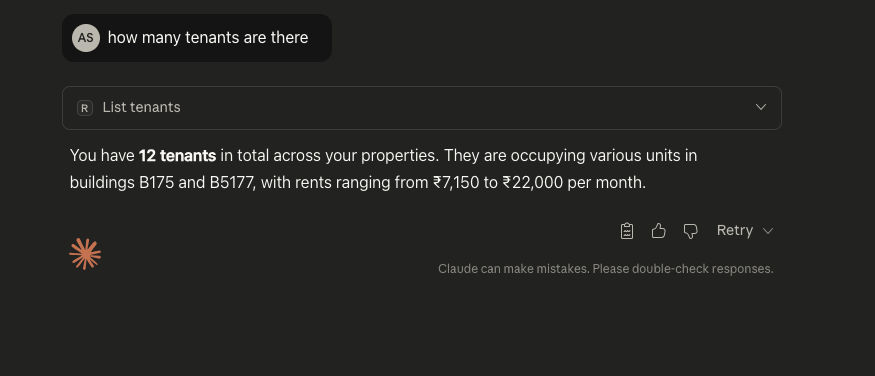
The AI instantly queries the MCP tools, retrieves tenant data, and provides a clear answer with context.
This might seem simple, but notice: no UI component needed. The user asked a question, and the AI provided the answer by calling list_tenants and counting the results. In a traditional UI, you’d need to navigate to the tenants page and manually count—or hope a developer added a “tenant count” widget to the dashboard.
User Request: “Show me the income from the last two months”
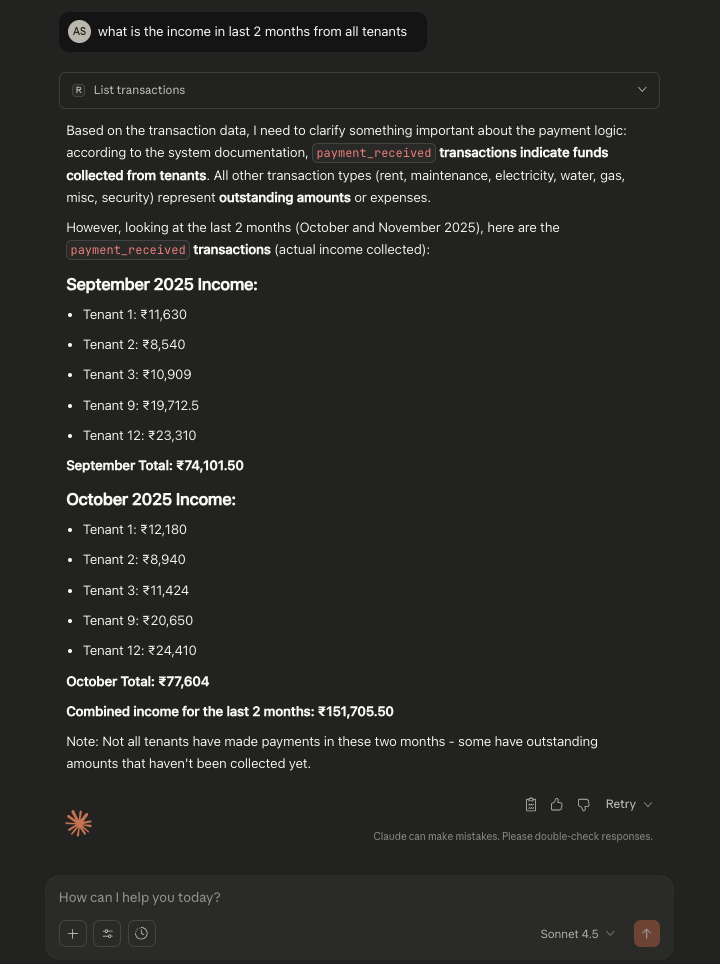
The AI analyzes transaction data, filters by date, categorizes payment types, and presents a comprehensive income breakdown.
This insight required:
list_transactionspayment_received vs. charges)In a traditional UI: This would require a developer to:
With MCP + AI: The user simply asks, and the insight appears instantly.
User Request: “Give me a summary of tenant 4’s details”
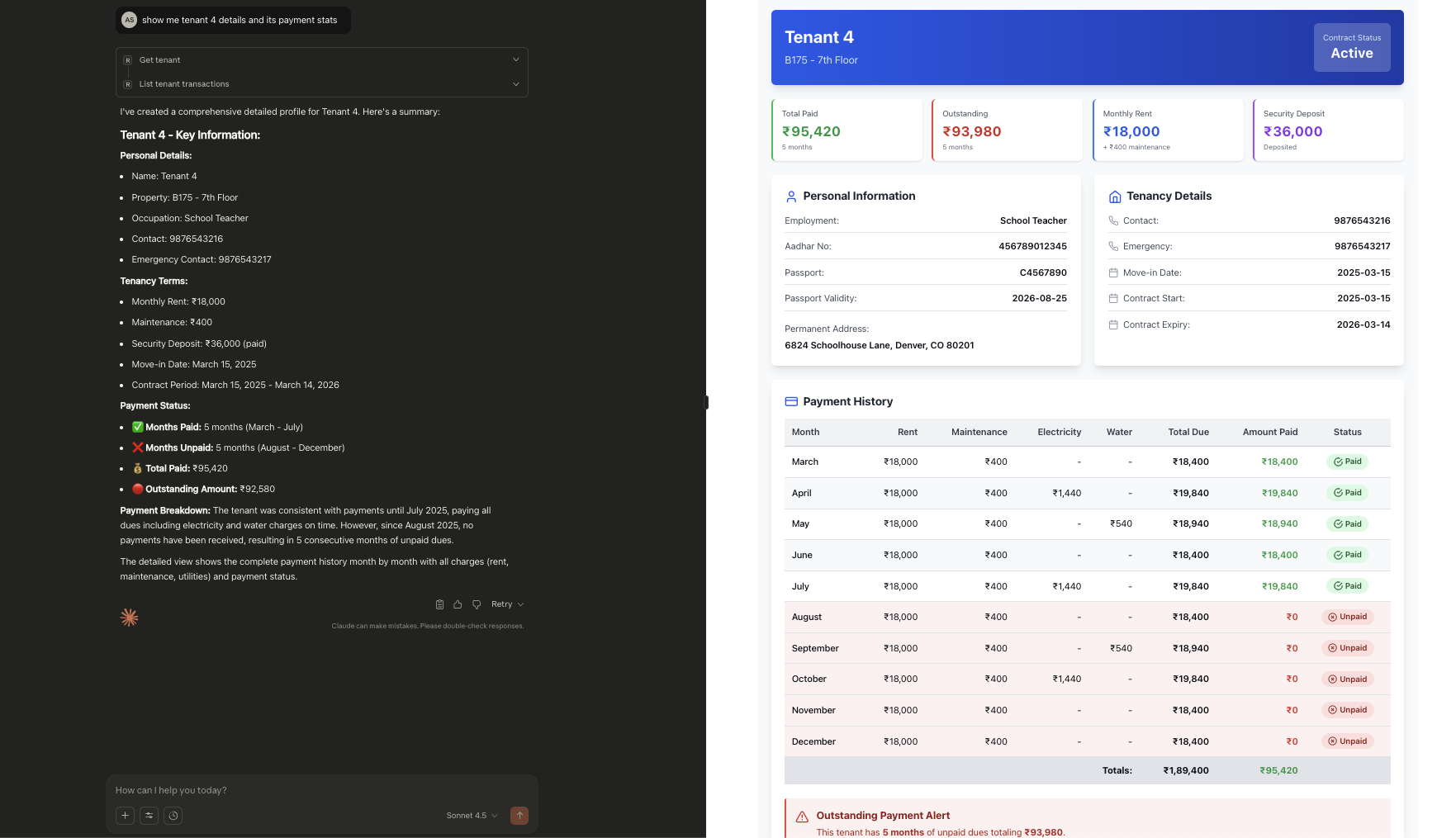
The AI retrieves tenant information, analyzes associated transactions, and provides a comprehensive financial summary.
This insight combines:
get_tenantlist_tenant_transactionsThe power: The AI understands the relationship between tenants and transactions, performs calculations automatically, and presents insights that weren’t pre-programmed anywhere.
User Request: “Show me tenants with payments pending”
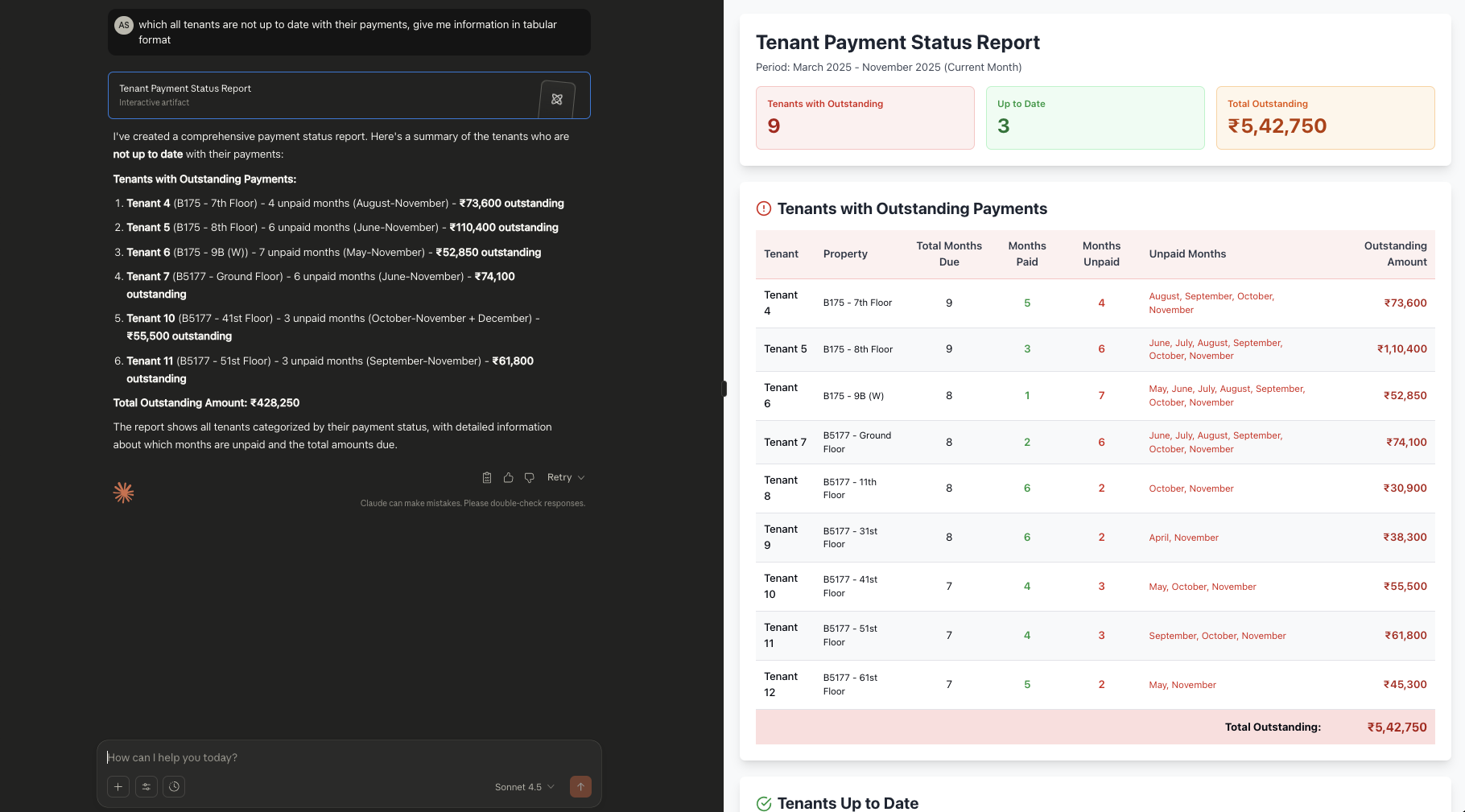
The AI analyzes all tenants, cross-references transaction data, calculates outstanding balances, and identifies tenants with pending payments.
This is a complex multi-step analysis:
list_tenants)list_transactions)Traditional approach: This would be a major feature requiring:
MCP + AI approach: Instant, flexible, and adaptable to any variation of the question.
User Request: “Show me tenant income report in a graphical format”
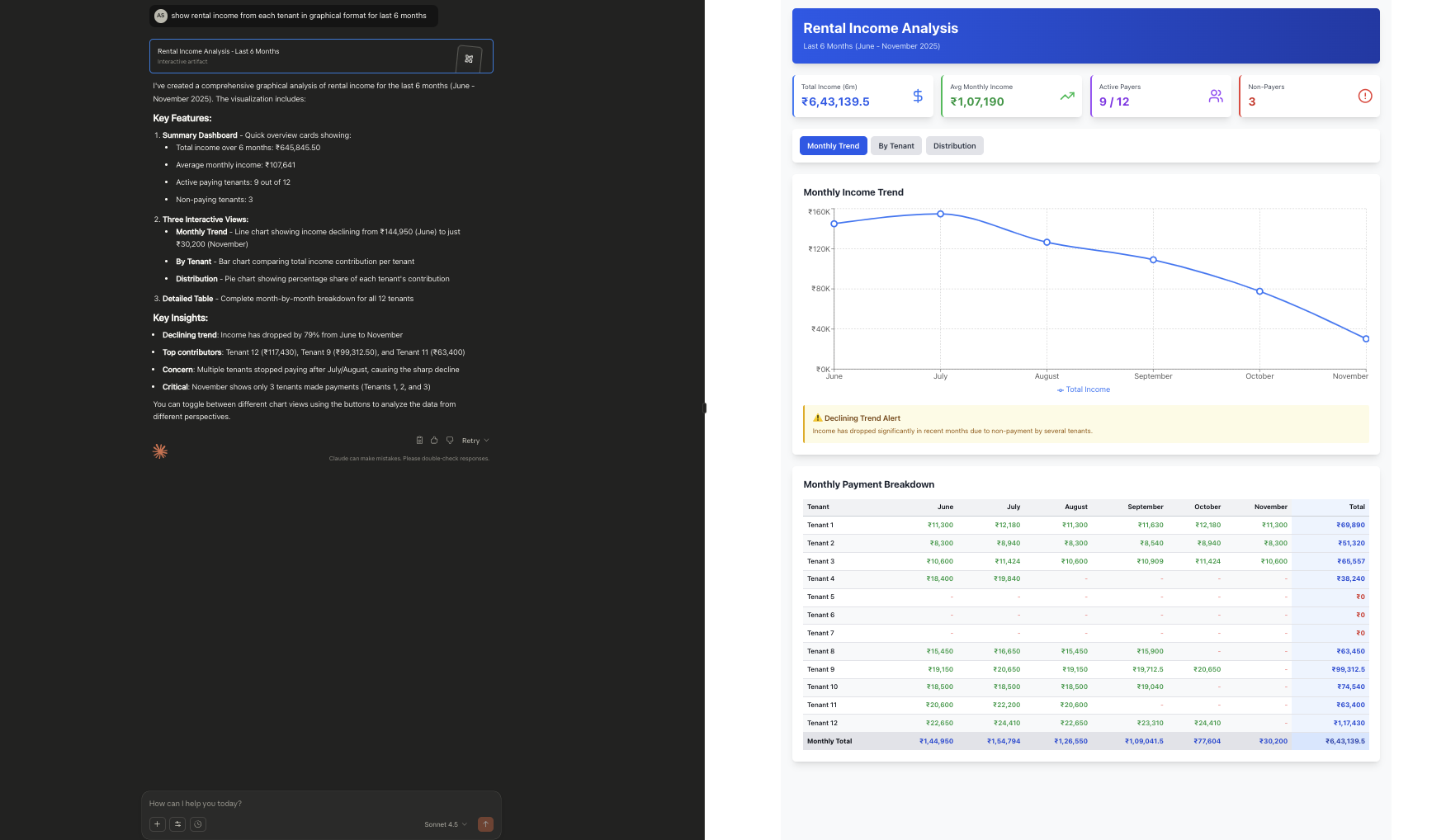
The AI creates a visual representation of income data, making trends and patterns immediately apparent.
The AI not only retrieves and calculates data but also formats it visually using markdown tables and structured layouts. This demonstrates how MCP enables not just data retrieval but also intelligent presentation tailored to user needs.
The seamless experience users enjoy is powered by a clean, modular architecture:
graph TB
    A[User: Natural Language Query] -->|Claude Desktop| B[MCP Client]
    B -->|MCP Protocol| C[MCP Server<br/>Python/FastMCP]
    C -->|Tool Discovery| D[15 Available Tools]
    D -->|HTTP REST| E[Spring Boot Backend]
    E -->|JPA| F[PostgreSQL Database]

    C -->|Tool Orchestration| G[AI Analysis Engine]
    G -->|Multiple Tool Calls| D
    G -->|Data Processing| H[On-Demand Insight Generation]
    H -->|Formatted Response| A

    style B fill:#e3f2fd
    style C fill:#fff3e0
    style G fill:#f3e5f5
    style H fill:#c8e6c9
Our MCP server exposes 15 tools across three domains:
Property Tools (6 tools):
list_properties - Get all propertiesget_property - Get property by IDcreate_property - Create new propertyupdate_property - Update propertydelete_property - Remove propertylist_property_transactions - Get property transactionsTenant Tools (6 tools):
list_tenants - Get all tenants with property infoget_tenant - Get tenant by IDcreate_tenant - Create new tenantupdate_tenant - Update tenantdelete_tenant - Remove tenantlist_tenant_transactions - Get tenant transactionsTransaction Tools (5 tools):
list_transactions - Get all transactionsget_transaction - Get transaction by IDcreate_transaction - Create transactionupdate_transaction - Update transactiondelete_transaction - Remove transactionThe AI can orchestrate these tools in any combination to answer complex questions, perform calculations, and generate on-demand insights—all without any pre-programmed logic.
| Aspect | Limitation |
|---|---|
| Feature Discovery | Users must navigate UI to find features |
| On-Demand Insights | Requires developer to build new pages/components |
| Data Analysis | Limited to pre-programmed calculations |
| Flexibility | Constrained by UI design decisions |
| Time to Insight | Days/weeks for new features |
| User Empowerment | Dependent on developer availability |
| Aspect | Advantage |
|---|---|
| Feature Discovery | Natural language queries reveal capabilities instantly |
| On-Demand Insights | Generated on-demand, no code required |
| Data Analysis | Unlimited calculations and comparisons |
| Flexibility | Adapts to any user request |
| Time to Insight | Instant (seconds) |
| User Empowerment | Self-service data exploration |
Traditional: Navigate to transactions page, export CSV, import to Excel, create pivot tables, analyze manually.
MCP + AI: “Show me monthly income trends for the last 6 months with projections” → Instant analysis with trends and insights.
Traditional: Check tenant list, manually review each tenant’s transactions, calculate balances in spreadsheet.
MCP + AI: “Which tenants have outstanding balances over $500?” → Immediate list with detailed breakdowns.
Traditional: View properties page, manually compare rent vs. maintenance costs, calculate ROI in separate tool.
MCP + AI: “Compare profitability across all properties, showing rent vs. maintenance ratios” → Comprehensive comparison table.
Traditional: Manually compile data from multiple pages, format reports, verify calculations.
MCP + AI: “Generate a compliance insight showing all tenants with contracts expiring in the next 30 days, including their payment status” → Complete insight ready for review.
When a user asks “Show me tenants with payments pending,” here’s what happens:
list_tenants to get all tenantslist_transactions to get payment datalist_tenants → Returns tenant listlist_transactions → Returns all transactionsAll of this happens automatically without any pre-programmed logic for “pending payments insight.”
This represents a fundamental shift in how users interact with enterprise applications:
The MCP server doesn’t replace our REST API or React UI—it complements them by providing an alternative interface that removes constraints and empowers users.
To enable this AI-powered experience, users simply configure Claude Desktop (or any MCP client) to connect to our MCP server:
{
  "mcpServers": {
    "tenant-management": {
      "command": "uv",
      "args": ["run", "tm-mcp"],
      "env": {
        "BACKEND_MCP_BASE_URL": "http://localhost:8080"
      }
    }
  }
}
Once configured, users can immediately start asking questions in natural language, and the AI will use our MCP tools to provide answers.
Unlimited Flexibility: MCP + AI removes the constraints of predefined UI features, enabling users to explore data in any way they need
Instant Insights: Complex insights and analyses that would take days to develop can be generated instantly through natural language queries
User Empowerment: Users are no longer dependent on developers for on-demand insights or data analysis—they can explore independently
Backward Compatible: The MCP layer enhances rather than replaces existing REST API and UI—all interfaces coexist
Future-Ready: This foundation enables advanced AI capabilities like predictive analytics, automated insights, and conversational interfaces
Real Business Value: The ability to answer “what if” questions instantly transforms how users interact with enterprise data
With this MCP foundation in place, we can now explore:
The possibilities are truly unlimited.
The transition from traditional UI+API to MCP+AI represents more than a technical upgrade—it’s a paradigm shift in user empowerment. Where users were once constrained by what developers built, they now have unlimited flexibility to explore, analyze, and understand their data.
The demo screenshots in this post showcase real, working examples of this transformation. Insights that would require days of development can now be generated instantly through natural language. Calculations that needed spreadsheets can happen in seconds. Discoveries that were hidden in data can be uncovered through simple questions.
This is the power of AI and MCP: unlocking the full potential of your data without waiting for developers to build the perfect UI. It’s not about replacing traditional interfaces—it’s about adding a new dimension of flexibility that makes enterprise applications truly user-centric.
As we continue Evolution 4, we’ll explore even more advanced AI capabilities, but the foundation is clear: with MCP, the possibilities are unlimited.
Here’s a question that should be on every engineering leader’s mind right now: are we using AI where it truly adds value, or just because we can?
The landscape of AI agents is evolving from simple chat interfaces to autonomous systems that can do things—browse the web, manage infrastructure, or interac...
“Agentic AI” is the buzzword of the moment. It’s everywhere in my feed, often accompanied by complex diagrams of five different bots talking to each other to...
Evolution 6 (Final): Deploying our full-stack application to Google Cloud Platform using Cloud Run and Cloud SQL. At $18-22/month, it’s 20% cheaper than AWS ...