Following the architectural foundation established in Tenant Management Java Stack: System Architecture, this post provides a comprehensive demo walkthrough of the working application. The focus is on user experience, interface design, and practical functionality demonstration.
Evolution Context: This post is part of Evolution 3: Java Enterprise Stack in the Tenant Management Evolutionary Project. This evolution focuses on enterprise patterns and Spring Boot migration, building upon the modular architecture established in Evolution 2.
Application Overview
The Tenant Management application is now a fully functional web application running at http://localhost:3000, featuring a modern React frontend integrated with a Spring Boot backend. The application demonstrates enterprise-ready patterns while maintaining an intuitive user interface.
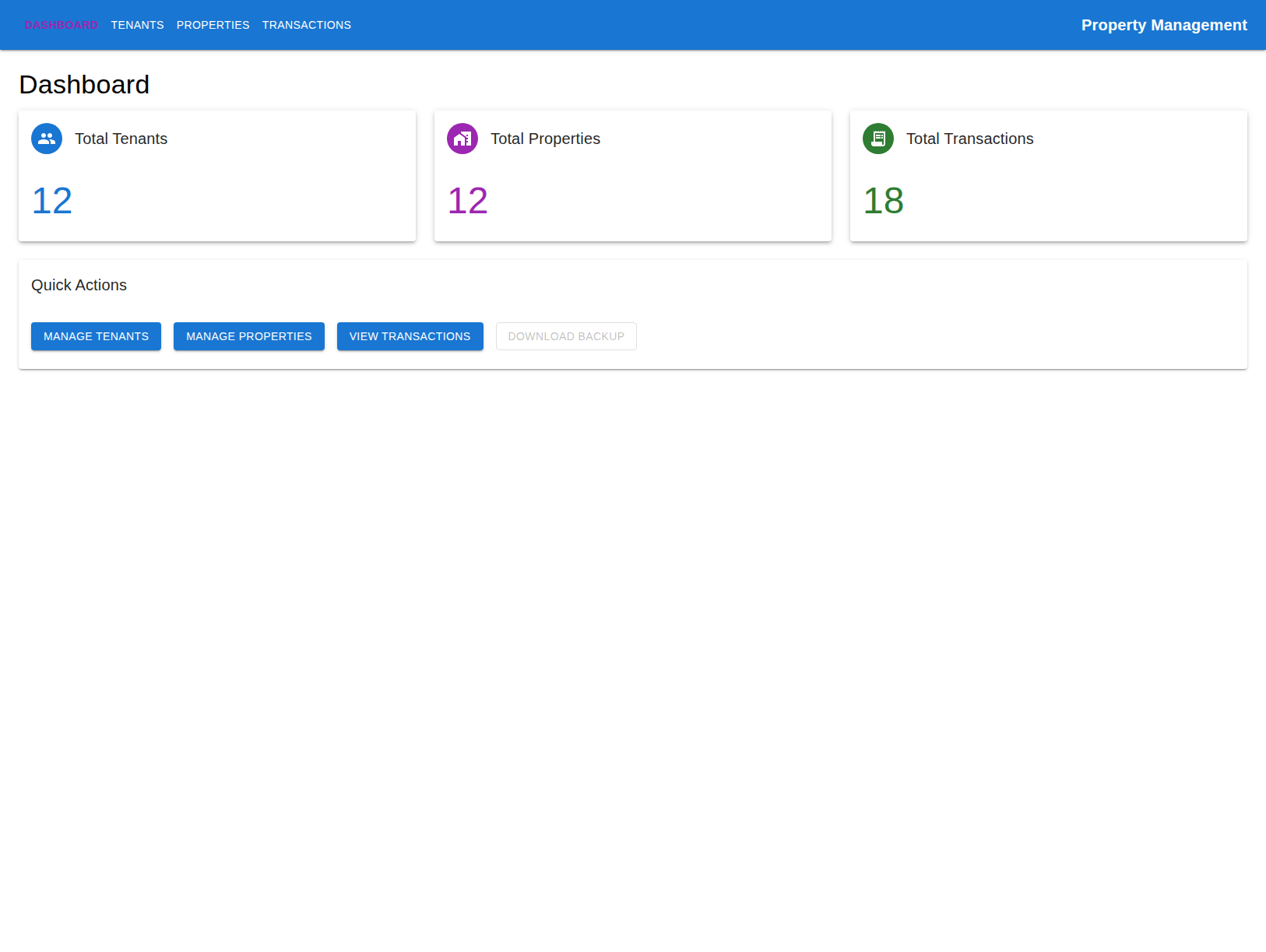
The main dashboard provides a comprehensive overview of the property management system with key metrics and quick action buttons.
User Interface Walkthrough
Dashboard - Central Command Center
The dashboard serves as the central hub, displaying key metrics and providing quick access to all major functions:
- Total Tenants: Real-time count of active tenants
- Total Properties: Number of managed properties
- Total Transactions: Complete transaction history count
- Quick Actions: Direct access to tenant, property, and transaction management
The interface uses Material-UI components for a consistent, professional appearance with responsive design principles.
Tenants Management - Comprehensive Tenant Oversight
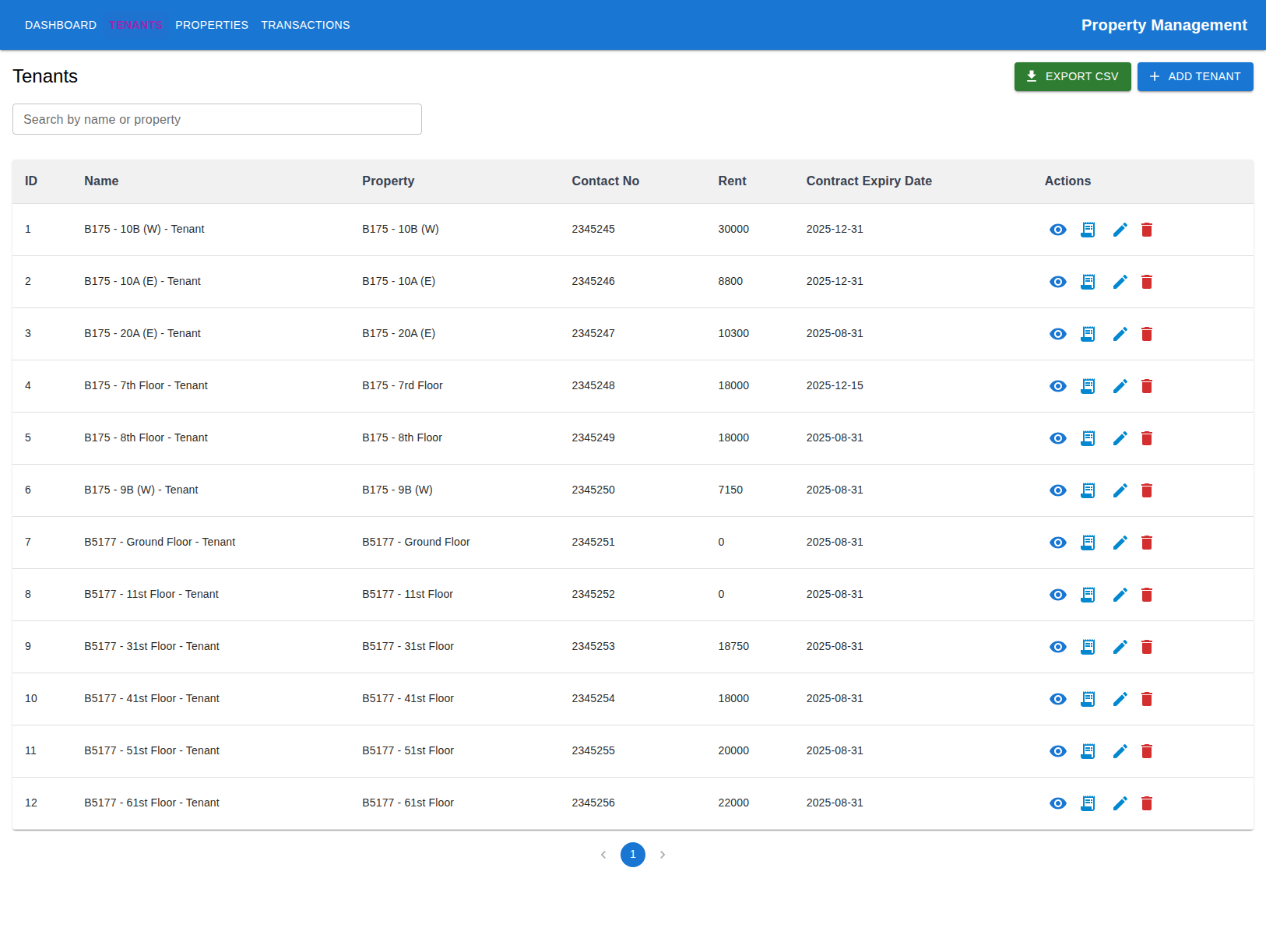
The tenants page provides a complete view of all tenants with detailed information and management capabilities.
The tenants interface features:
- Comprehensive Tenant List: Displays all tenant information including ID, name, property, contact details, rent amount, and contract expiry dates
- Search Functionality: Real-time search by tenant name or property address
- Action Buttons: Each tenant has multiple action options:
- Details: View complete tenant information
- Transactions: Access tenant-specific transaction history
- Edit/Delete: Modify or remove tenant records
- Export Capabilities: CSV export functionality for data portability
- Pagination: Efficient handling of large tenant datasets
Tenant Details Modal
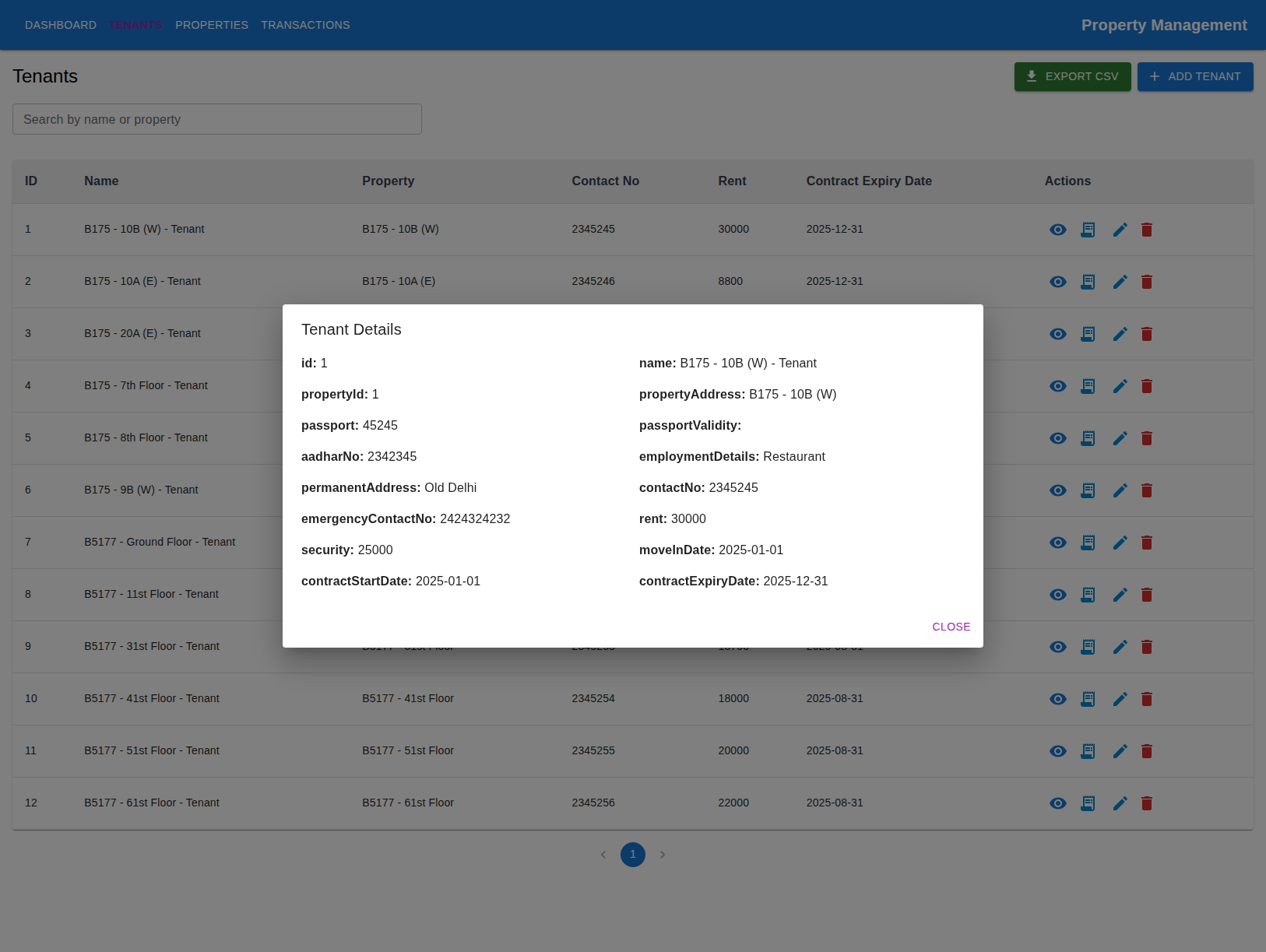
Clicking on a tenant’s details button reveals comprehensive information in a clean, organized modal.
The tenant details modal provides:
- Complete Profile Information: ID, name, property details, and contact information
- Documentation Details: Passport information, Aadhar number, and employment details
- Financial Information: Rent amount, security deposit, and contract dates
- Address Information: Both current and permanent addresses
- Emergency Contacts: Emergency contact information for safety
Properties Management - Property Portfolio Overview
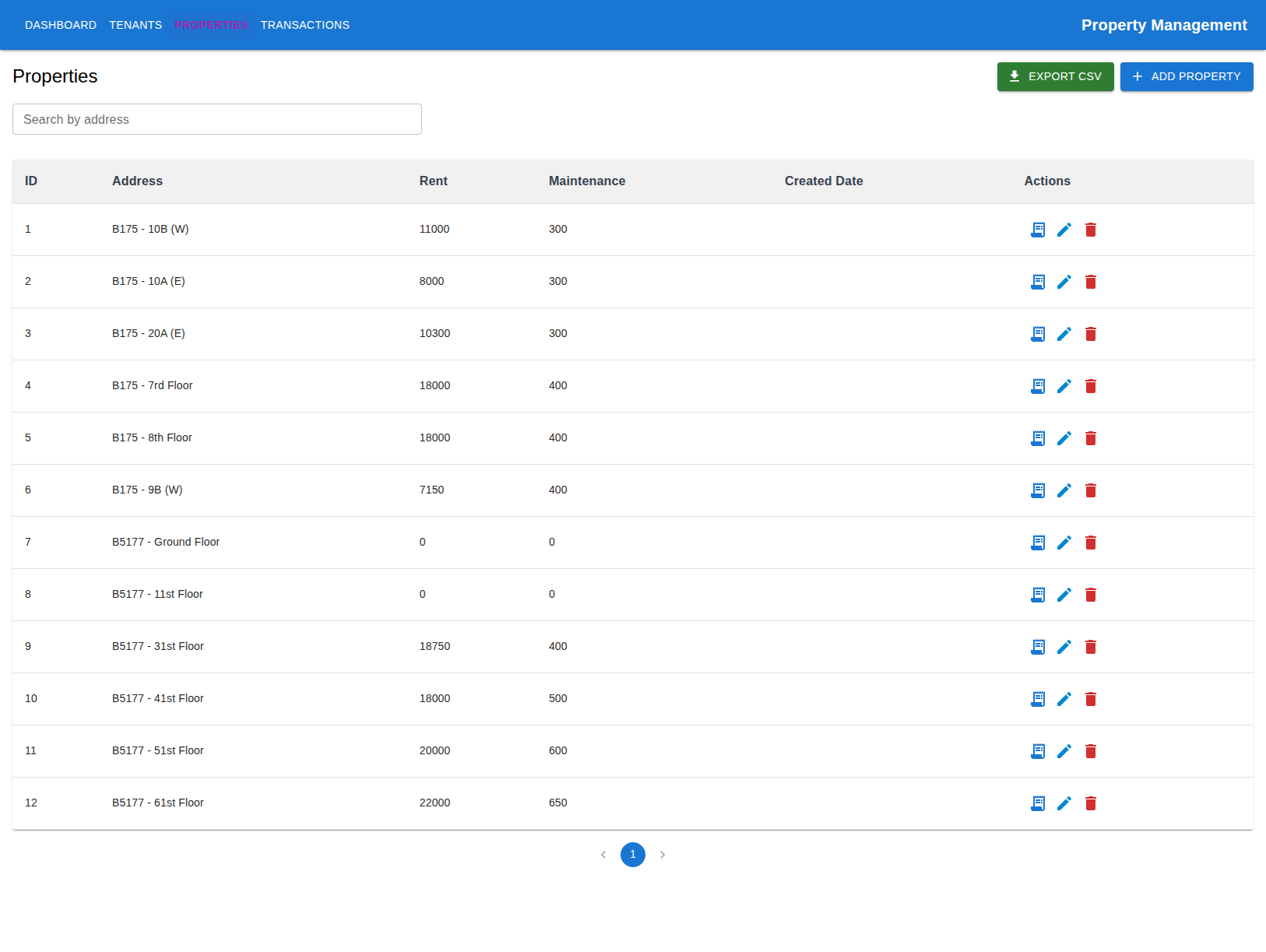
The properties page offers a complete view of the property portfolio with financial details and management options.
The properties interface includes:
- Property Portfolio: Complete list of all managed properties
- Financial Details: Rent amounts and maintenance costs for each property
- Search Functionality: Search by property address
- Transaction Access: Direct access to property-specific transactions
- Management Actions: Edit, delete, and transaction management for each property
- Export Options: CSV export for property data
Transactions Management - Financial Tracking
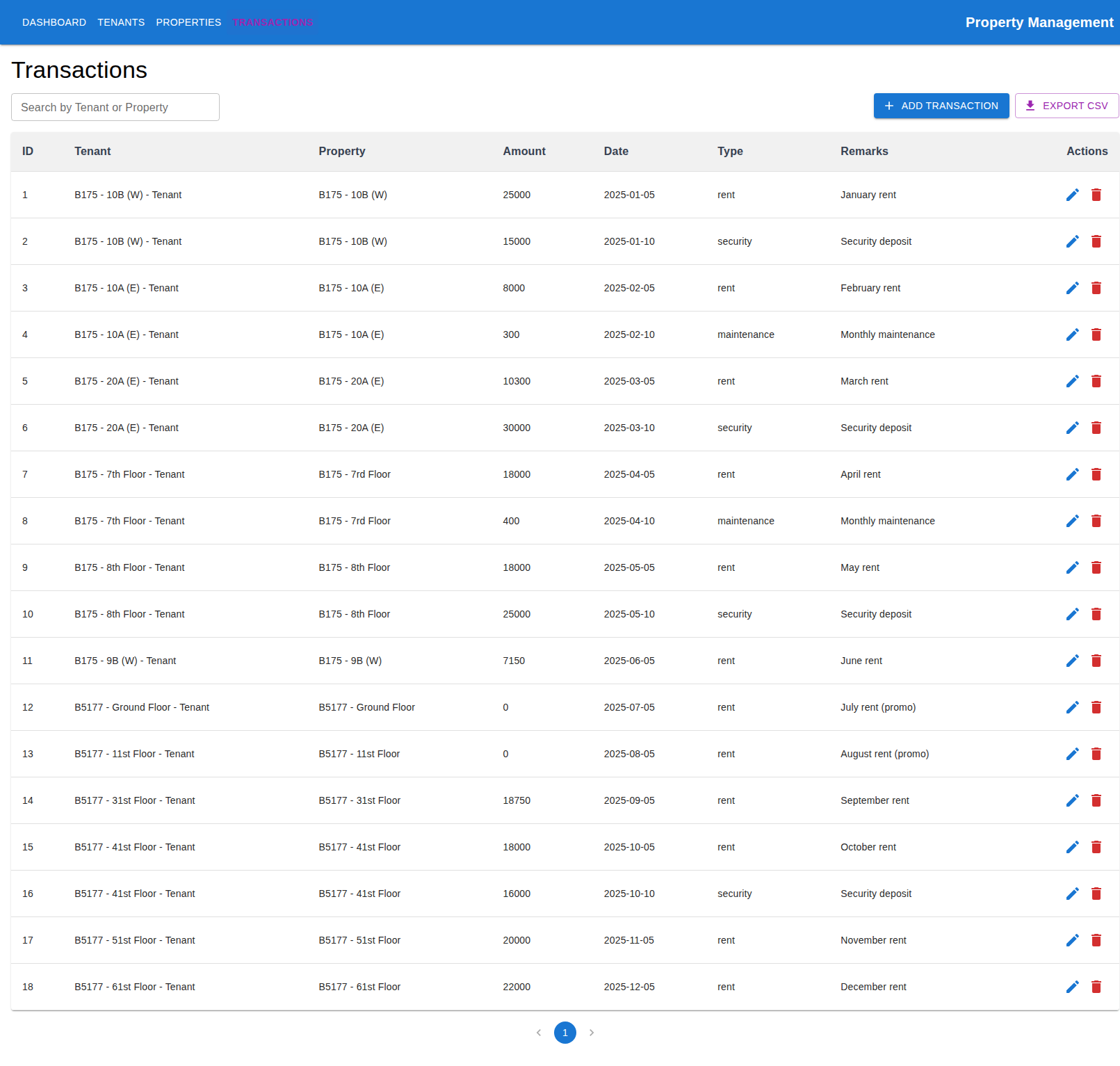
The transactions page provides comprehensive financial tracking with detailed transaction history.
The transactions interface features:
- Complete Transaction History: All financial transactions with detailed information
- Transaction Types: Rent, security deposits, maintenance, and miscellaneous transactions
- Search and Filter: Search by tenant or property name
- Transaction Details: Amount, date, type, and remarks for each transaction
- Add New Transactions: Easy creation of new financial records
Add Transaction Modal
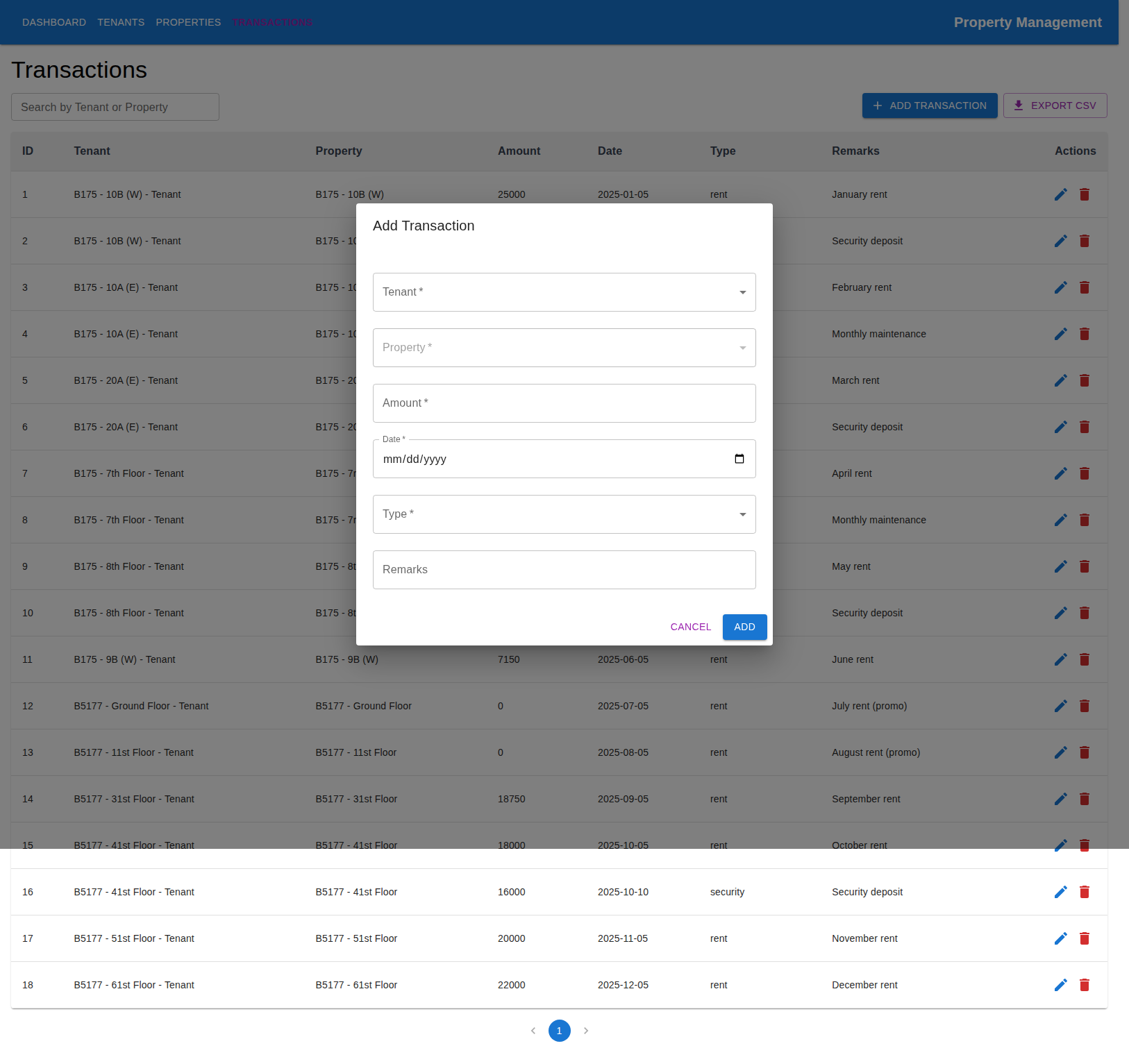
The add transaction modal provides an intuitive form for creating new financial records.
The transaction creation form includes:
- Tenant Selection: Dropdown to select the tenant for the transaction
- Property Selection: Automatic property selection based on tenant
- Amount Input: Numeric input for transaction amounts
- Date Selection: Date picker for transaction dates
- Transaction Type: Dropdown for transaction categories (rent, security, maintenance, etc.)
- Remarks Field: Optional comments for transaction context
User Experience Highlights
Intuitive Navigation
The application features a clean, intuitive navigation system:
- Top Navigation Bar: Easy access to all major sections
- Breadcrumb Navigation: Clear indication of current location
- Quick Actions: Dashboard shortcuts for common tasks
- Responsive Design: Optimized for different screen sizes
Data Management Features
- Real-time Updates: All changes are immediately reflected in the interface
- Search and Filter: Powerful search capabilities across all data types
- Export Functionality: CSV export for data portability
- Pagination: Efficient handling of large datasets
- Modal Interfaces: Clean, focused interfaces for data entry and viewing
Error Handling and Feedback
- Toast Notifications: Immediate feedback for user actions
- Form Validation: Client-side validation with clear error messages
- Loading States: Visual indicators during data operations
- Error Recovery: Graceful handling of network and server errors
Technical Implementation Highlights
Frontend Architecture
// Example of component structure
const Tenants = () => {
  const [tenants, setTenants] = useState([]);
  const [loading, setLoading] = useState(false);
  const [openModal, setOpenModal] = useState(false);

  const fetchTenants = useCallback(async () => {
    setLoading(true);
    try {
      const response = await axios.get('/api/tenants');
      setTenants(response.data);
    } catch (error) {
      toast.error('Failed to fetch tenants');
    } finally {
      setLoading(false);
    }
  }, []);

  // Component logic...
};
Backend Integration
The React frontend seamlessly integrates with the Spring Boot backend through:
- RESTful API Calls: Standard HTTP methods for CRUD operations
- Axios HTTP Client: Reliable HTTP communication
- Error Handling: Comprehensive error handling and user feedback
- Loading States: User-friendly loading indicators
Database Integration
- Real-time Data: All data is fetched from the live database
- Consistent State: Data consistency across all interface components
- Transaction Management: Proper handling of database transactions
- Data Validation: Both client and server-side validation
Key User Workflows
Tenant Management Workflow
- View Tenants: Access the tenants page to see all tenant information
- Search Tenants: Use the search functionality to find specific tenants
- View Details: Click on tenant details to see complete information
- View Transactions: Access tenant-specific transaction history
- Add New Tenants: Use the “Add Tenant” button to create new tenant records
Property Management Workflow
- View Properties: Access the properties page to see all managed properties
- Search Properties: Use search to find specific properties
- View Transactions: Access property-specific transaction history
- Manage Properties: Edit or delete property records as needed
Transaction Management Workflow
- View Transactions: Access the transactions page to see all financial records
- Search Transactions: Use search to find specific transactions
- Add Transactions: Use the “Add Transaction” button to create new financial records
- Filter by Type: Use transaction type filters to organize data
Interface Design Principles
Material-UI Integration
The application leverages Material-UI components for:
- Consistent Design: Unified design language across all components
- Accessibility: Built-in accessibility features and keyboard navigation
- Responsive Design: Mobile-friendly interface that works on all devices
- Professional Appearance: Clean, modern interface suitable for business use
User Experience Focus
- Intuitive Navigation: Clear, logical navigation structure
- Visual Feedback: Immediate feedback for all user actions
- Error Prevention: Form validation and user guidance
- Efficiency: Quick access to common tasks and functions
Technical Achievements
Full-Stack Integration
- ✅ React Frontend: Modern, responsive user interface
- ✅ Spring Boot Backend: Robust, scalable backend architecture
- ✅ Database Integration: Real-time data synchronization
- ✅ API Communication: Seamless frontend-backend communication
- ✅ Error Handling: Comprehensive error handling and user feedback
- ✅ Loading States: User-friendly loading indicators
- ✅ Search Functionality: Powerful search across all data types
- ✅ Export Features: Data portability through CSV export
User Interface Features
- ✅ Dashboard Overview: Central command center with key metrics
- ✅ Tenant Management: Complete tenant information and management
- ✅ Property Management: Property portfolio overview and management
- ✅ Transaction Tracking: Comprehensive financial transaction management
- ✅ Modal Interfaces: Clean, focused interfaces for data entry
- ✅ Responsive Design: Mobile-friendly interface design
- ✅ Search and Filter: Advanced search capabilities
- ✅ Export Functionality: Data export for external use
Evolution Progression
This demo represents a significant milestone in the evolutionary journey:
- From Evolution 2: Built upon the modular monolith architecture and service layer patterns
- To Evolution 3: Introduced enterprise-ready patterns, containerization, and Java ecosystem depth
- Current Achievement: Fully functional web application with modern user interface
- Next Steps: Focus on advanced features, testing strategies, and production deployment
Key Learnings
- User Interface Design: Learned to create intuitive, user-friendly interfaces
- Full-Stack Integration: Gained experience with React-Spring Boot integration
- User Experience: Understood the importance of user feedback and error handling
- Responsive Design: Implemented mobile-friendly interface design
- Data Management: Learned to handle complex data relationships in the UI
- Component Architecture: Gained experience with React component design patterns
Looking Ahead
The application is now ready for:
- Advanced Features: Enhanced reporting, analytics, and automation
- Testing Implementation: Comprehensive testing strategies
- Production Deployment: Production-ready deployment and monitoring
- Performance Optimization: Advanced performance tuning and caching
- Security Enhancements: Authentication, authorization, and data protection
This demo showcases the successful evolution from a simple single-file application to a comprehensive, enterprise-ready property management system with a modern, intuitive user interface.
October 09, 2025
Learning, Development, Java
Today I kicked off a new chapter for the Tenant Management application by rebuilding it as a React + Spring Boot proj...
tenant-management
spring-boot
react
October 10, 2025
Learning, Architecture, System-Design
Building on the hands-on migration I shared in Tenant Management App: Spring Boot and React Transition, this post doc...
spring-boot
react
system-architecture
October 11, 2025
Learning, Development, Demo
Following the architectural foundation established in Tenant Management Java Stack: System Architecture, this post pr...
tenant-management
spring-boot
react
Evolution Summary
Total Posts: 3
Focus: Spring Boot Migration
Technologies: Java, Spring Boot, React, Docker
Project: Tenant Management: An Evolutionary Project
Evolution: Java Enterprise Stack
Focus: Spring Boot Migration
Status:
✅ Complete
Conclusion
The Tenant Management application demo represents a significant achievement in the evolutionary journey. The application now provides a complete, user-friendly interface for property management with modern design principles and enterprise-ready architecture. This foundation sets the stage for advanced features, testing strategies, and production deployment in the next phases of the project.